
I will show you how to jailbreak your FireStick and get those apps that aren’t available on the Amazon Store.
Quick note: There isn’t technically anything called “jailbreaking a FireStick.” I still use the term because that’s what most people search for. In reality, we’re simply sideloading apps, similar to installing APK files on an Android device.
It’s not like jailbreaking an iPhone or anything advanced. You’re basically just changing a couple of settings to allow apps from outside the Amazon App Store.
I’ll use the phrase “jailbreak FireStick” in this guide because it’s easier to understand, but in reality, you’re simply sideloading apps.
What Have I Included Here & What to Expect
- Step-by-step Instructions: I have provided the same steps I have followed to sideload apps on my FireStick.
- Screenshots with markings: Every step includes a screenshot highlighting where to click or which button to press.
- Apps & Tools: I will share the names of all the apps I have used and what they do.
- Safety Tips: I will also share the safety measures I take with the jailbroken FireStick to keep my personal information safe.
- Easy to follow: I have tried my best to keep the instructions as simple as possible.
- Legal angle: I have also added legal notes based on my experience.
What is Jailbreaking?
Jailbreaking simply means removing the default restrictions on your Fire TV so you can install apps that aren’t available in the Amazon App Store. This lets you access more streaming options that you wouldn’t otherwise find.
However, jailbreaking a FireStick isn’t the same as jailbreaking an iPhone or rooting an Android device.
Jailbreaking a mobile device is a complicated and risky process. On the other hand, jailbreaking a FireStick is straightforward.
For FireStick Users
ISPs, hackers, and other third-party entities worldwide may monitor your online activities. For security, privacy, and smooth streaming, it is recommended to use a reliable VPN for FireStick. Your IP address is visible to sites you visit.
I recommend ExpressVPN, a fast and secure VPN. It is very easy to install on any device, including an Amazon Fire TV Stick. Also, it comes with a 30-day money-back guarantee. If you don't like their service, you can always ask for a refund. ExpressVPN also has a special deal where you can get 4 months free and save 81% on the 2-year plan.
Read: How to Install and Use the Best VPN for FireStick
| Feature/Aspect | FireStick | Mobile |
|---|---|---|
| Definition | Installing third-party apps not available on the Amazon App Store | Removing device restrictions for full system control |
| Difficulty Level | Easy: No technical knowledge or special tools required | Difficult: It is a complicated process and requires technical expertise |
| Risk Level | None (if you are using trusted apps like Kodi) | High (can brick the device) |
| Legal Status | Legal | Legal, but may void warranty |
| Device Warranty | Not voided | Often voided |
| System Access | No root or deep system access | Full root access to system files |
| Security Risks | Minimal to none | High (can expose system vulnerabilities) |
| Purpose | Install third-party apps | To customize OS, install mods, remove bloatware |
| Reversibility | Easy (fully reversible) | Difficult (requires flashing stock firmware) |
| Tools Used | Downloader from Amazon Store | Magisk, TWRP, SuperSU (Android); Checkra1n, unc0ver (iOS) |
| Popular Among | Streamers | Advanced users, modders, developers |
Why Do You Jailbreak FireStick?
- Access More Apps – Install third-party apps that are not yet available on the Amazon App Store.
- Enhance Your Streaming Experience – Customize your FireStick with better media players and streaming tools.
- Take Full Control of Your Device — You can sideload better streaming apps on FireStick, without compromising warranty.
Is It Safe & Legal?

Jailbreaking a FireStick is both safe and legal, as long as you are not streaming any copyrighted content.
As already discussed, it is safe because you are not changing any system-level files (unlike jailbreaking and rooting).
It is legal because you own the device and are simply adjusting the settings Amazon provides. It also does not void your device’s warranty.
However, streaming pirated or copyrighted content is illegal. FireStickTricks.com does not support piracy. We recommend watching public-domain movies and shows to avoid legal trouble.
How to Jailbreak FireStick (Updated Feb 2, 2026)
Legal Disclaimer: This tutorial is purely educational. FireStickTricks.com doesn’t own, host, operate, resell, or distribute any streaming apps, addons, websites, IPTV or services. The page contains some unverified services, and we are not certain whether they hold legal licenses to distribute the content. FireStickTricks.com does not verify the legality of each app/service in all regions. Do your due diligence if you use any of the unverified apps/services, and stream only content that is available in the public domain. The end-user shall be solely responsible for the media accessed.
The following steps will guide you through sideloading apps on the Amazon Fire TV Stick.
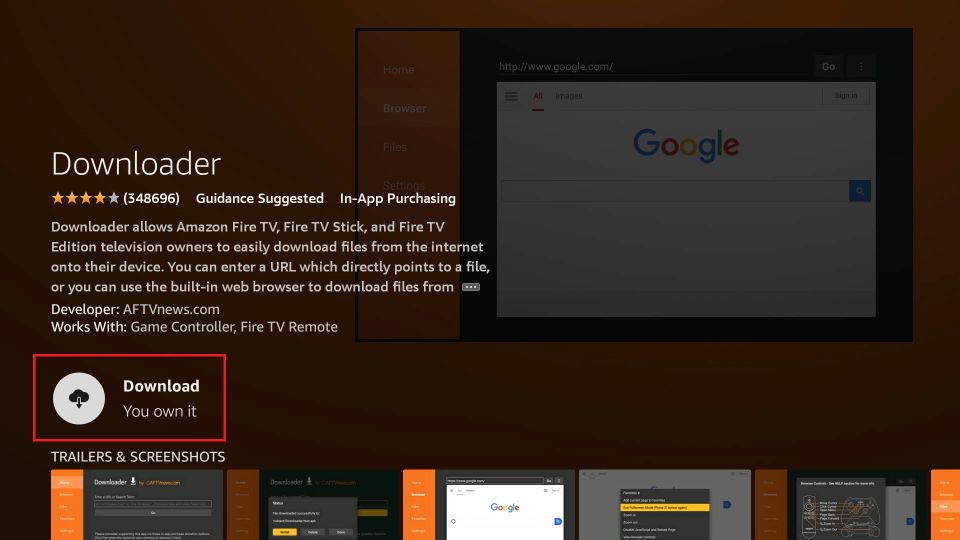
Step 1: Install APK Downloader on FireStick
The app is called Downloader, and it can be found on the Amazon Appstore.
1. Go to the home screen of your Amazon Fire TV Stick and select Find in the middle bar, followed by Search.
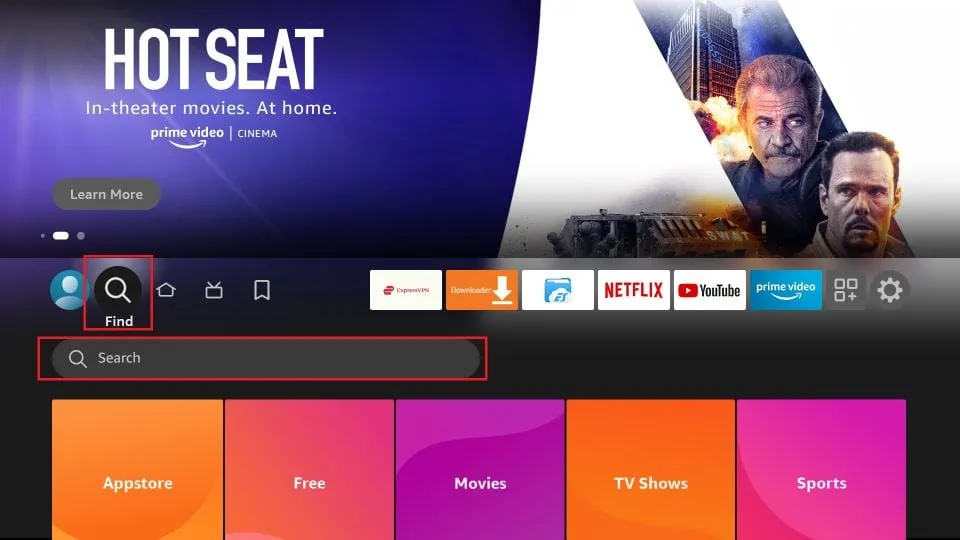
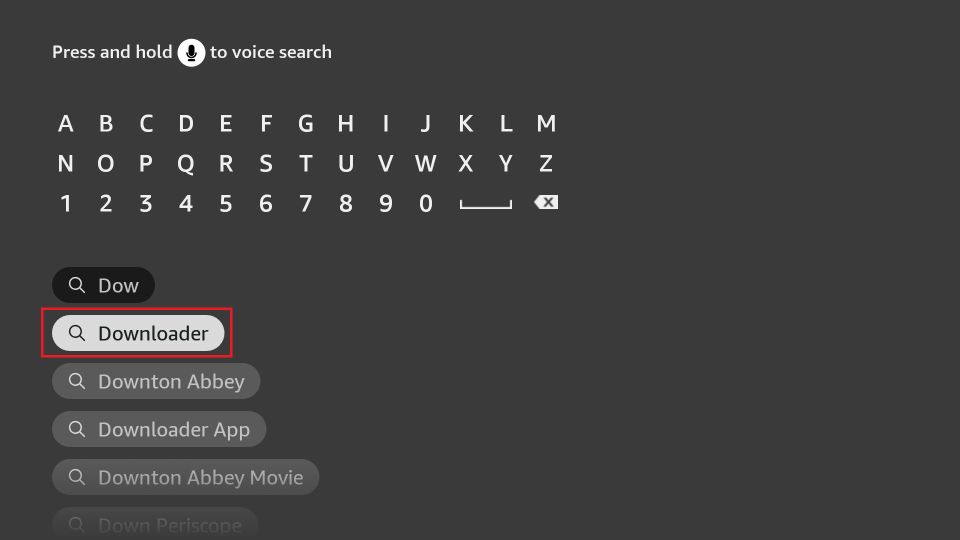
2. Type and click Downloader in the search suggestions.
3. Click the Downloader app tile.
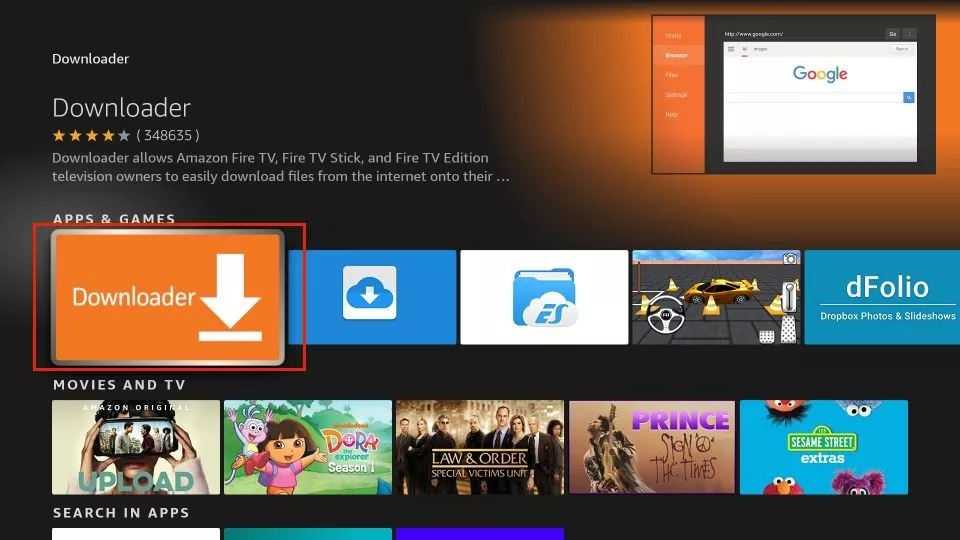
5. Click Get or Download.
Step 2: Allow Unknown Sources
This is the ONLY setting you will change in the entire jailbreaking process.
After changing this setting, the Downloader app can install third-party apps.
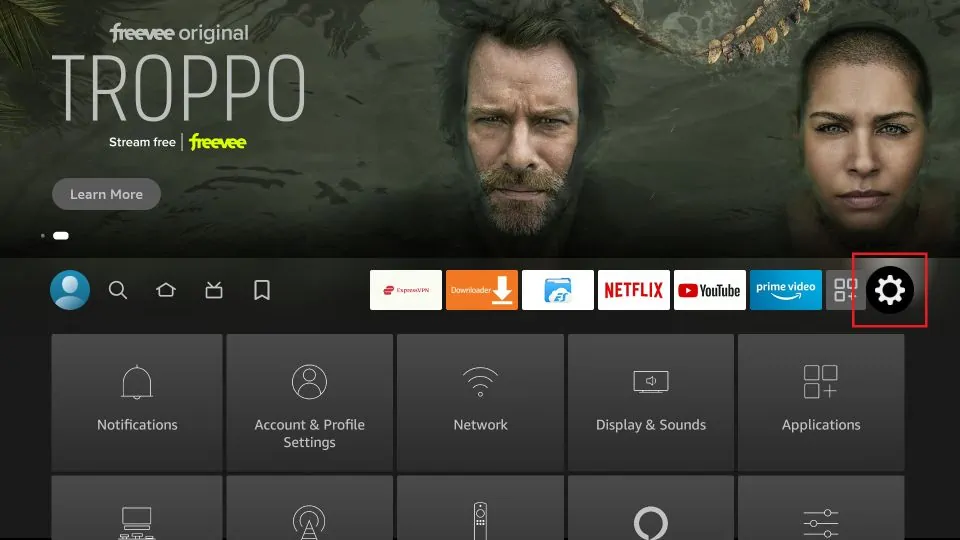
1. Select Settings on the FireStick home screen.
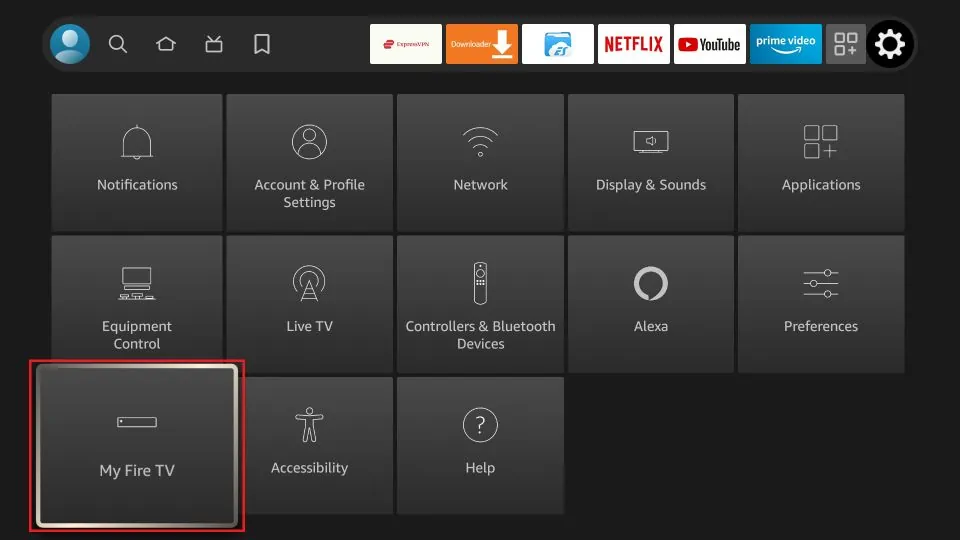
2. Click My Fire TV.
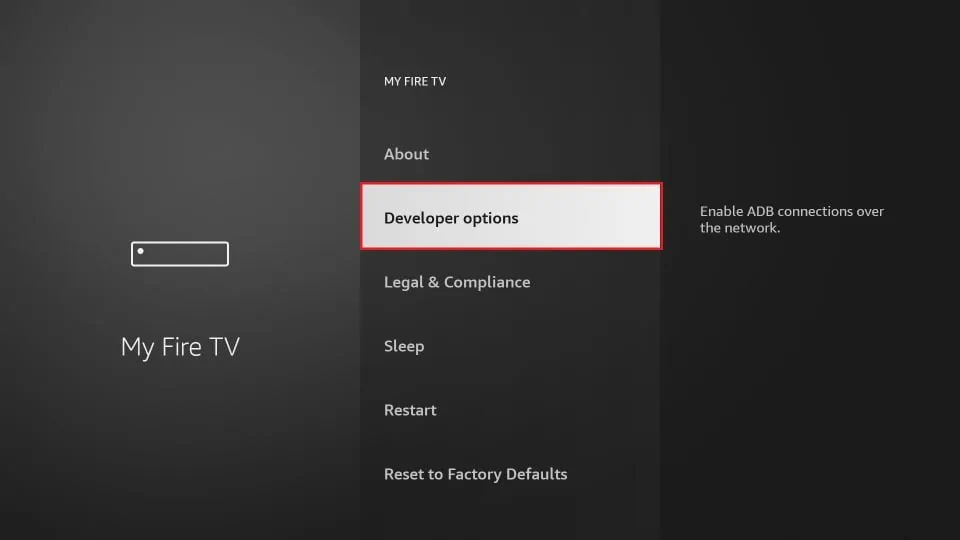
3. Click Developer options.
Now, select Fire TV Stick and click it 7 times to enable Developer Options. If you’re still not sure how to do it, here’s a step-by-step guide to enable developer options.
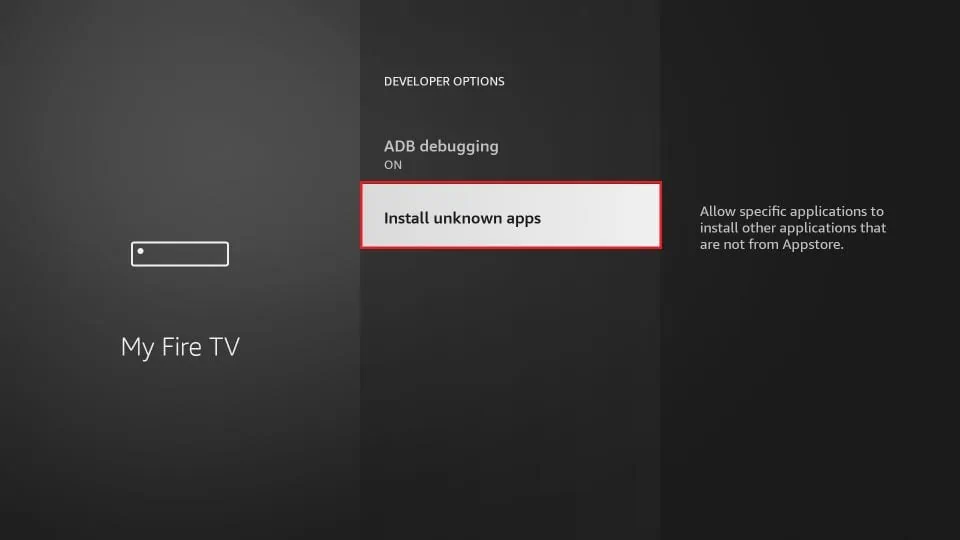
4. Click on Install Unknown Apps.
You will see one of the following two options depending on your FireStick device version:
- Option 1 (new devices) - Install Unknown Apps: Click it and proceed to the next step to enable Downloader.
- Option 2 (old devices) - Apps from Unknown Sources: Click this option and then click Turn On on the following prompt. Skip the next step.
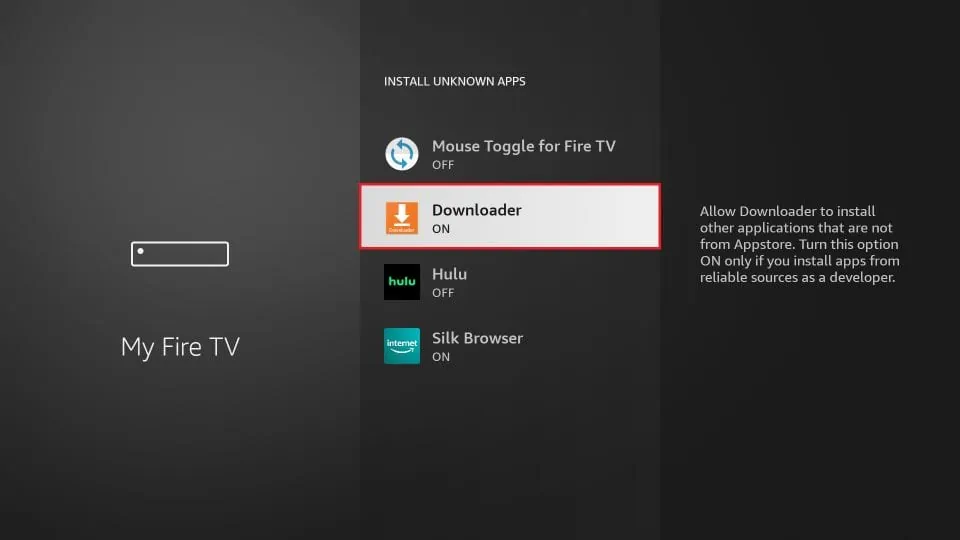
5. Click Downloader and turn it ON.
Step 3: Jailbreak Firestick
One of the most popular apps for jailbroken FireStick is Kodi. This media application offers access to a vast array of content, including movies, TV shows, sports, live TV channels, children’s content, and more.
All you need is the right Kodi addons and builds that offer official, legal, and cost-effective streaming solutions.
We will jailbreak the FireStick with Kodi using the Downloader app, which you have downloaded from the Amazon App Store. This method is called sideloading. Here are the steps:
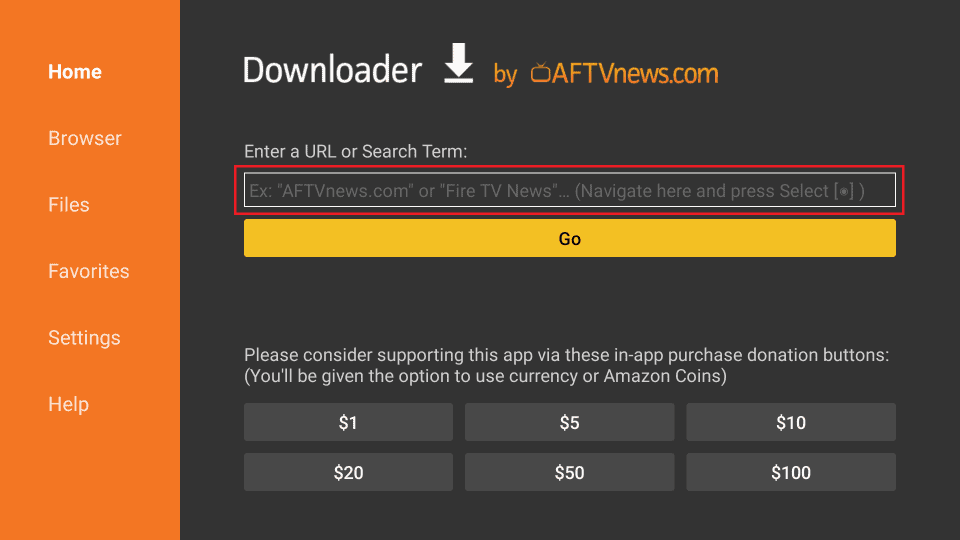
1. Open the Downloader app and click the URL text box as highlighted in the image below.
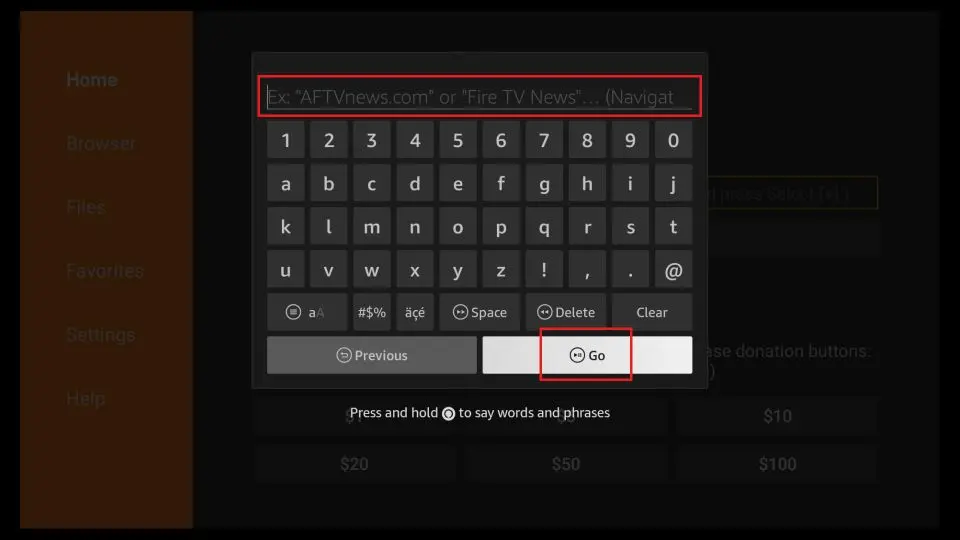
2. When this window is displayed, enter the Kodi APK URL (kodi.tv/download) and click Go.
3. Wait for the Downloader app to download the Kodi 21.3 Omega APK file.
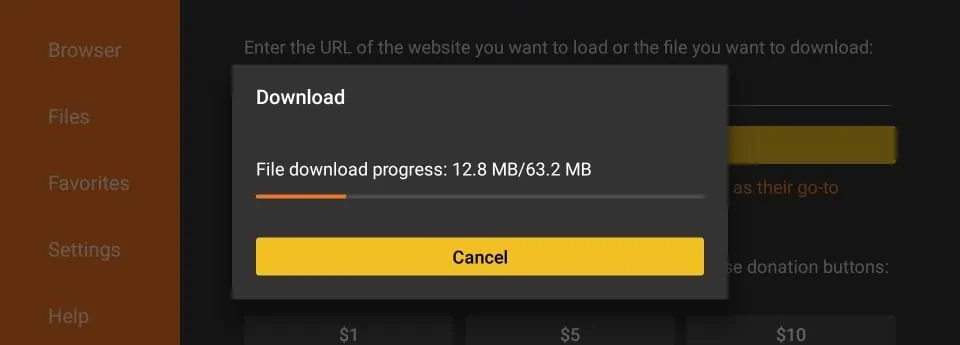
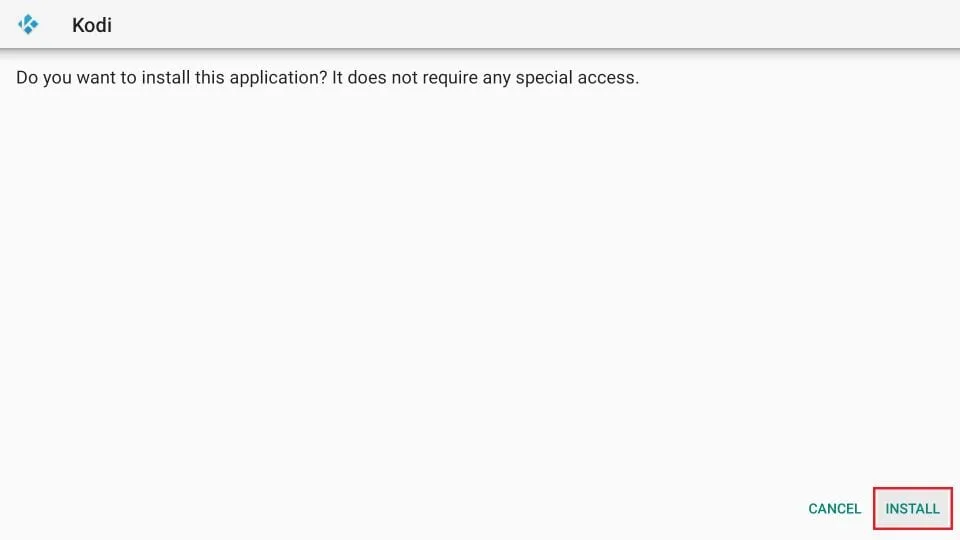
4. Once the APK file is downloaded, the Downloader app will prompt you to install the Kodi app. Click Install.
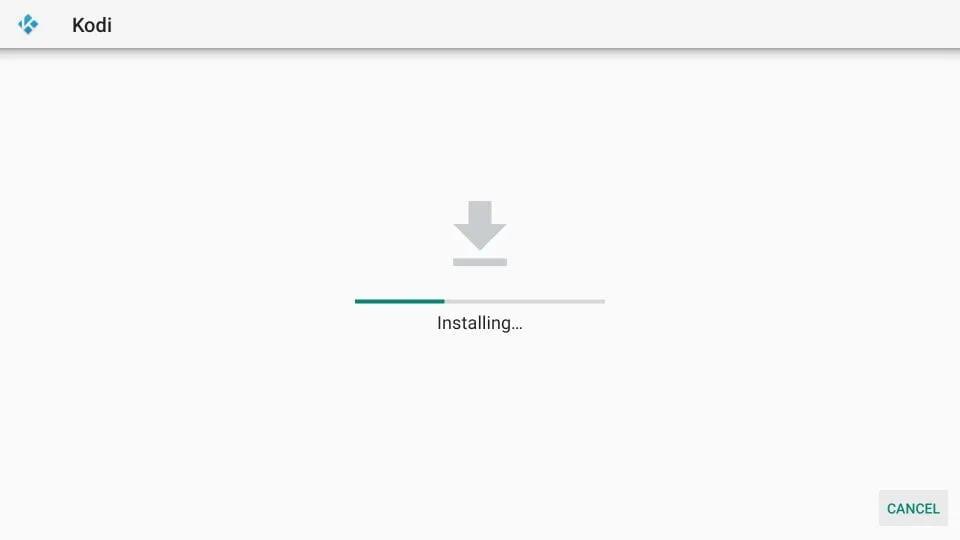
5. Wait for the Kodi app to install.
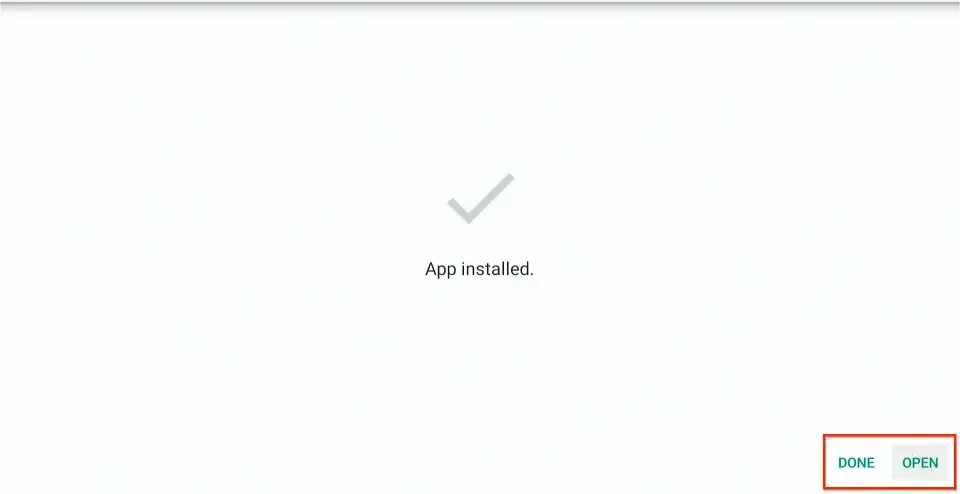
6. Click OPEN to launch the app.
7. If you open Kodi for the first time, it will typically take a minute to upload the files. This is what the Kodi home screen looks.
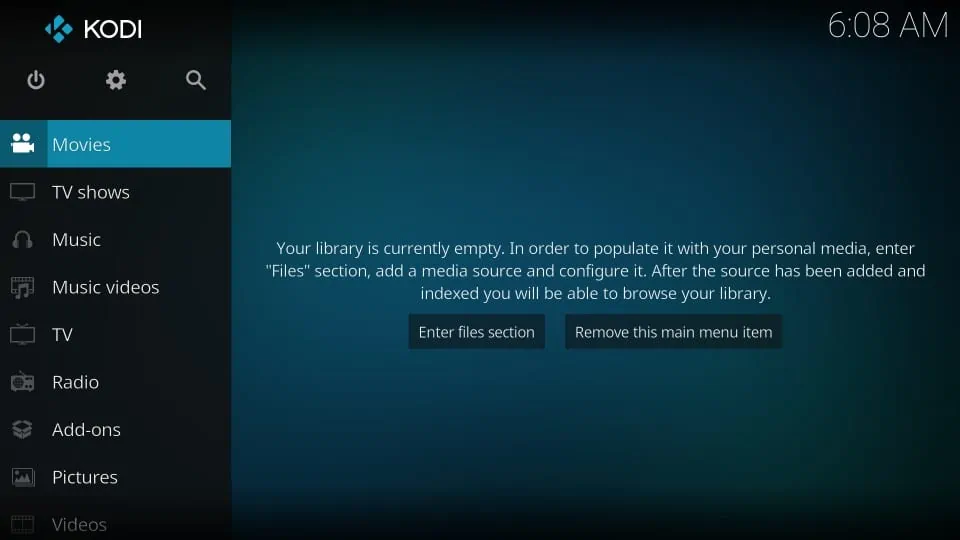
Congratulations! You have jailbroken your FireStick and sideloaded your first third-party app.
How to Use Jailbroken FireStick
Your ISP may throttle your internet connection, resulting in buffering. For smooth streaming, I recommend using a reliable VPN.
I recommend ExpressVPN. It’s a reputable VPN with strong encryption and fast connections, and it’s straightforward to install on Fire TV/FireStick and other devices.
Step 1: Subscribe to ExpressVPN HERE. It comes with a 30-day money-back guarantee. You can use it free for the first 30 days, and if you are not satisfied with the performance (which is highly unlikely), you can ask for a full refund.
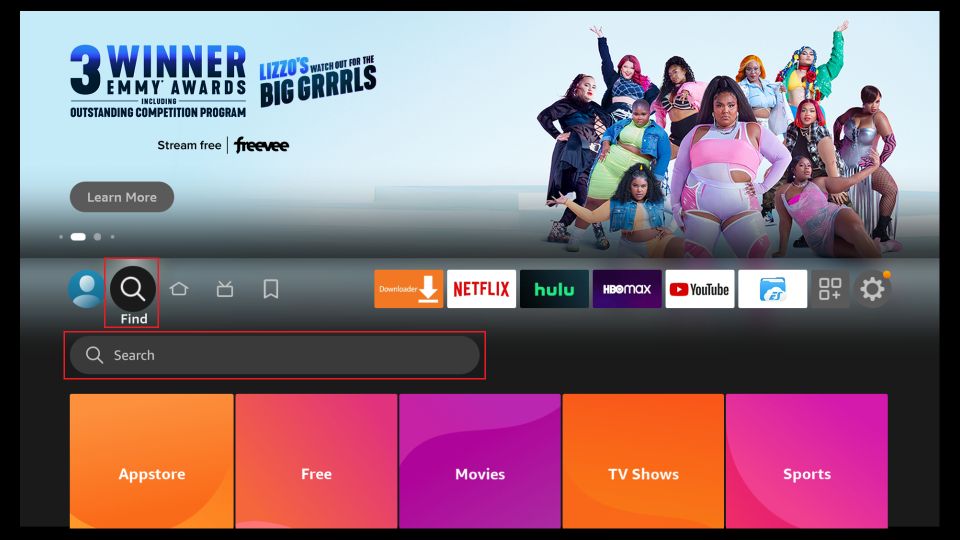
Step 2: Power ON your Fire TV Stick and go to Find, followed by the Search option.
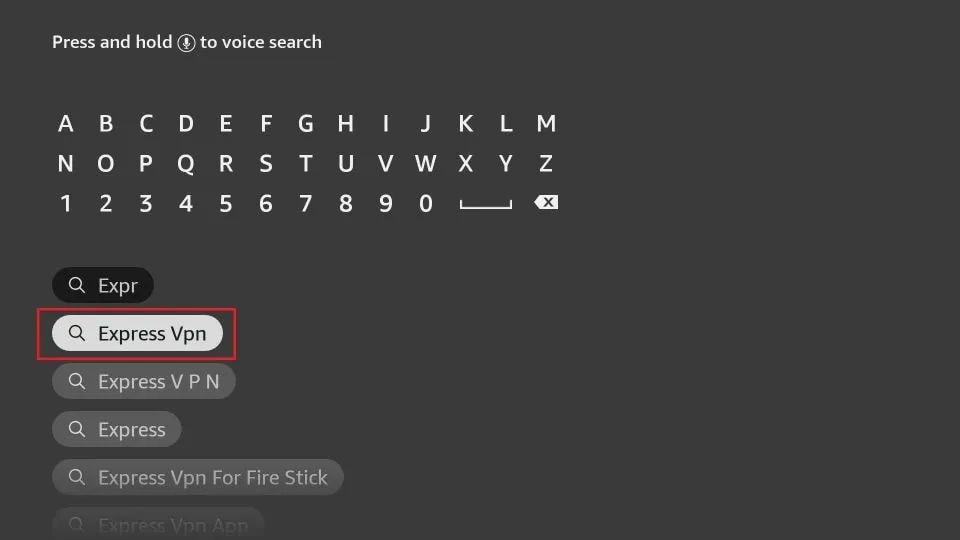
Step 3: Now type “Expressvpn” (without quotes) in the search bar and select ExpressVPN when it appears in the search results.
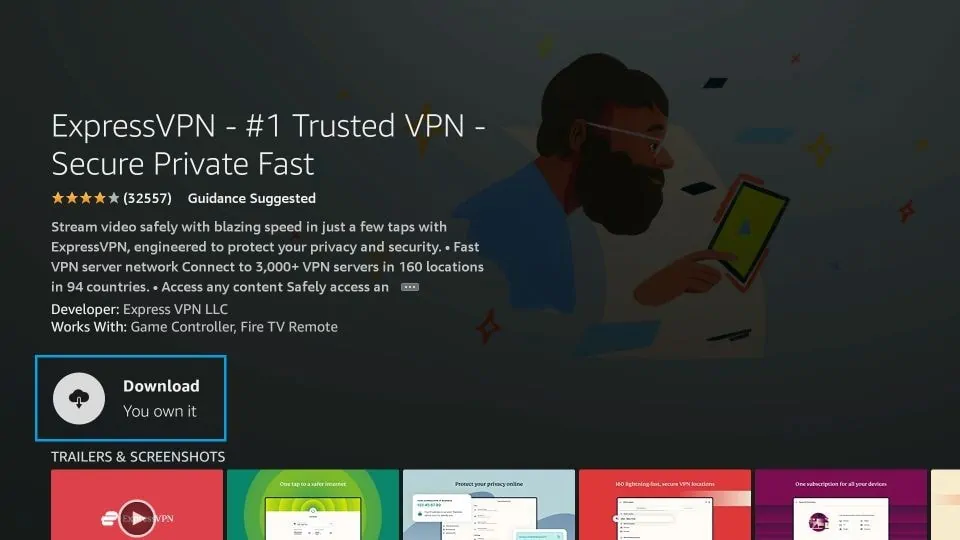
Step 4: Click Download to install the ExpressVPN app on Fire TV / Stick.
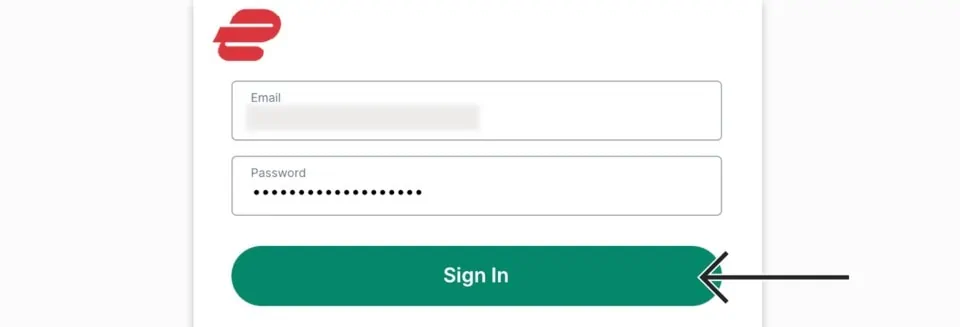
Step 5: Open the app and enter the login credentials you created while buying the ExpressVPN subscription. Click Sign in.
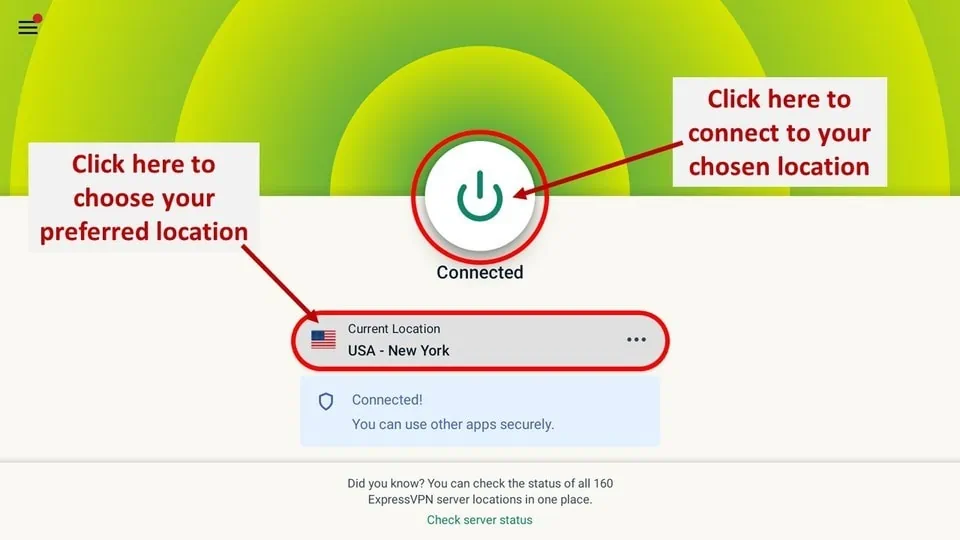
Step 6: Click the Power icon to connect to a VPN server. That’s all. Your connection is now secure with the fastest and best VPN for FireStick.
Even though you have installed Kodi, it is just the start. We must now learn to use Kodi to stream movies, shows, live TV, and more.
What you need to do now is install Kodi add-ons or builds.
Kodi Addons
Kodi is just a media player that doesn’t host any content. To access content on the application, you need special plugins called addons. The Kodi addons source content from the internet and deliver it to the app for streaming.
Kodi addons come in two types: official and unofficial. Verified creators develop official addons and are available through the official Kodi repository, ensuring reliability and compliance with Kodi’s standards.
On the other hand, unofficial addons are created by unverified developers. They are hosted in unofficial repositories, and their content sources are unverified.
Explore our list of the best addons for Kodi. This list only contains official and legal addons. FireStickTricks.com is strictly against piracy and recommends using only official addons.
There are dozens of Kodi addons, but only a few offer reliable, high-quality streaming. Install these addons to get the most out of your Kodi app.
Kodi Builds
Kodi add-ons are useful, but you may need multiple add-ons to cover all your streaming needs. Installing many add-ons one by one can be cumbersome and time-consuming.
What if you could install a special plugin with preinstalled add-ons and a customized layout to enhance Kodi’s appearance?
A Kodi Build is a prepackaged plugin with preinstalled addons, a custom skin, and a theme. It also contains customer settings to enhance your Kodi streaming experience.
When you install a Kodi build, you replace the dull Kodi skin (background) with a new, intuitive interface, making navigation easier and more enjoyable. You make your Kodi app feel more personal and appealing.
However, ensure that the build you install only features official and legal add-ons. If you can’t find such a build, you can always create your own custom setup by first installing a Kodi skin and then adding one or more official addons.
How to Get a New App Store for FireStick
Now that you have unlocked restrictions on your Fire TV Stick, you can start streaming. But you can still do a lot more with it.
Your FireStick has the official Amazon App Store, which offers hundreds of apps. However, the Amazon Store does not include many cool apps to enhance your FireStick experience.
You can install the third-party app store Aptoide TV on your Fire TV Stick. Aptoide TV offers a diverse range of incredible apps that you won’t find on the Amazon App Store.
Note: Aptoide TV may feature third-party, unverified apps that claim to offer free streaming. Stay away from such apps. If they offer free streaming, it is likely to be illegal. Furthermore, such apps are known to contain malware and viruses. Only use Aptoide TV to download utility apps, tools, or legitimate streaming apps.
I have provided quick steps to install Aptoide on your FireStick or FireStick 4K. For detailed instructions, please refer to our guide on installing and using Aptoide TV on FireStick.
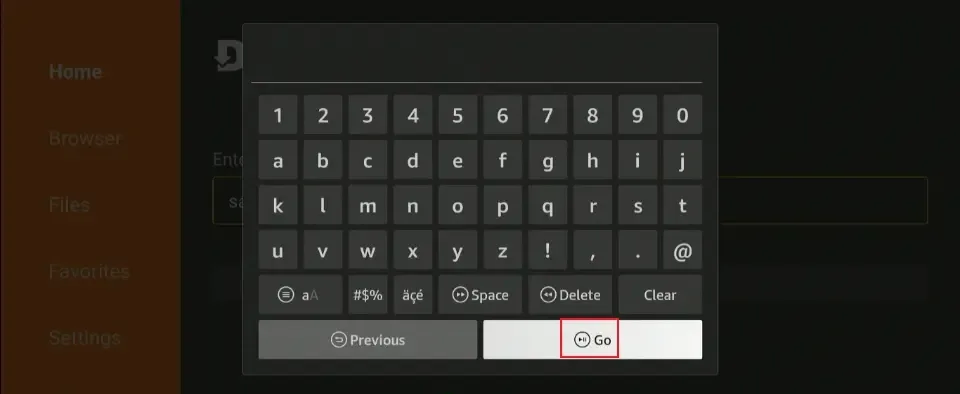
1. Open the Downloader app. Enter the Aptoide APK URL or Downloader code (example below) and click ‘Go’.
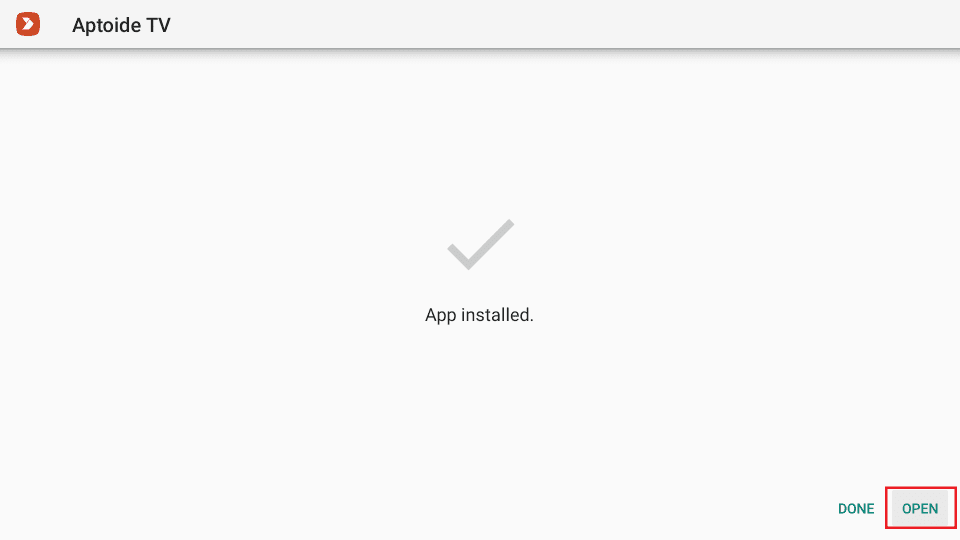
2. Choose Open when the app has been installed.
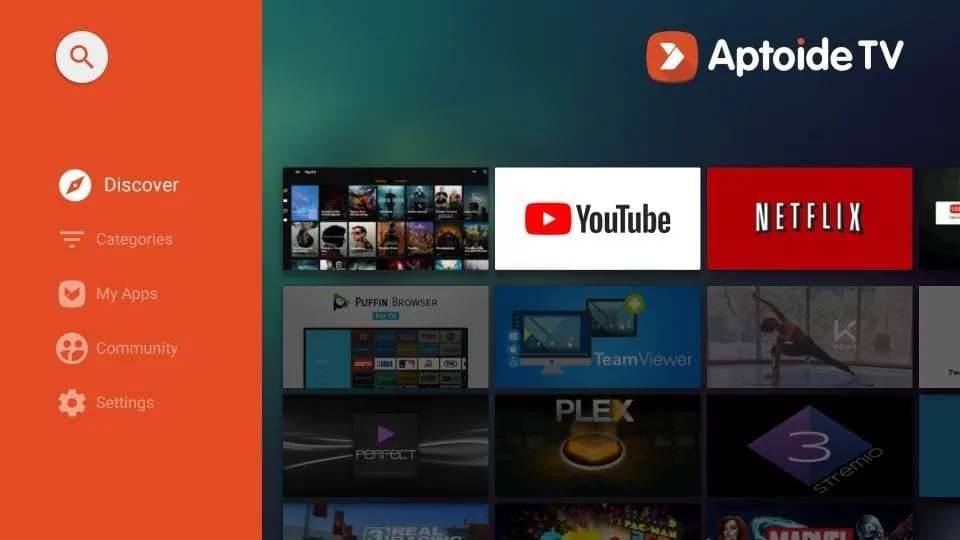
3. This is the home screen of the Aptoide TV on Fire TV Stick. You can start looking up the apps you want to install.
Frequently Asked Questions
A: No, sideloading apps on your FireStick does not void your warranty since you're only changing settings that Amazon provides. It's completely legal to modify your own device this way. However, what you stream matters - only use legal content sources and official add-ons to stay within the law.
A: Official add-ons are created by verified developers and available through Kodi's official repository. They're reliable, safe, and legal. Unofficial add-ons come from unverified sources and may access questionable content or contain security risks. We strongly recommend sticking to official add-ons only for both legal and security reasons.
A: A VPN isn't required for legal streaming, but it can help with ISP throttling that causes buffering issues. Some internet providers slow down streaming traffic, and a VPN can help maintain consistent speeds. Just remember that a VPN should be used for legitimate privacy and performance reasons, not to hide illegal activity.
A: Stick to builds and add-ons from the official Kodi repository or well-known, reputable sources. Avoid anything that promises "free movies and TV shows" or "unlimited content" - these are red flags for illegal streaming. When in doubt, create your own custom setup using only verified official add-ons.
Simply uninstall it immediately through your FireStick's settings menu (Settings > Applications > Manage Installed Applications). If you're unsure about any app, research it first or stick to well-known utility apps and legitimate streaming services. Remember, if an app offers "free" premium content, it's likely illegal.
Wrapping Up
This guide shows how to jailbreak FireStick. Jailbreaking is a legal process. Let me know your thoughts in the comments below.

Suberboost Your FireStick with My Free Guide
Stay Ahead: Weekly Insights on the Latest in Free Streaming!
No spam, ever. Unsubscribe anytime.





After I have jail broke my fire stick when I enter a side load code I get a storage permission required to store a file. What am I doing wrong?
Hi Kev, You need to enable storage permissions for the app you’re using to sideload. Go to Settings > Applications > Manage Installed Applications, select the app, and make sure Permissions are allowed. If the issue persists, try restarting your Firestick and re-entering the code. Let me know if you need further help!
Hi I cannot open my firestick account because someone else has my account although I signed up it says cannot use
Hi Stacey, Please contact Amazon Customer Support for assistance with your account issue. They will be able to help you regain access. You can refer to this guide: https://www.firesticktricks.com/amazon-firestick-customer-service.html
My firestick doesn’t have the “Developer options” setting? Is this because it is the “Lite” version?
Thanks
Hi KK, Developer Options are hidden by default on Firestick devices. If you want to enable them, this guide explains the process: https://www.firesticktricks.com/developer-options-firestick.html. Let me know if you have any questions!