
In this article, we’ll cover the best apps for jailbroken FireStick. These apps are compatible with all Fire TV devices, including Fire TV Stick Lite, Fire TV Stick HD, FireStick 4K, FireStick 4K Max, and Fire TV Cube.
What’s a Jailbroken Amazon FireSick?
Most people believe jailbreaking a FireStick is rooting its operating system or bypassing software restrictions. While this is true for devices like iPhones, it’s different for FireSticks.
Jailbreaking a FireStick means changing the device settings to allow the installation of apps from unknown sources, which is not allowed by default; FireStick developers only allow the installation of apps from the Amazon App Store.
To bypass the restriction, you only need to change a few settings and install the Downloader app, which helps you install apps from external sources. The app is available in the Amazon App Store.
Jailbreaking a FireStick is not a technical process, and you don’t need expert knowledge. Resellers use the word jailbreak to get your attention, but you can do it yourself at home.
A jailbroken Amazon FireStick opens the doors to endless entertainment. You can easily install and use apps that are not available in the Amazon App Store.
How to Jailbreak Amazon Fire TV
Jailbreaking a FireStick entails enabling the Developer Options, which allows you to install apps from unknown sources. This setting is disabled by default, so you must turn it on to jailbreak your device.
The Fire OS is based on the Android operating system. If an app’s verified APK file is available on the web, you can install the app on Fire TV devices using the Downloader app. This process is called sideloading.
Jailbreaking FireStick isn’t Actual Jailbreaking
In my opinion, the term jailbreak is overrated for FireStick.
Rooting an Android phone or jailbreaking an iOS device involves changing the source code and installing unauthorized firmware to enhance the device’s capabilities. This is unsafe for an average user and voids the company warranty for your device.
However, with the Amazon Fire TV Stick, you don’t modify any system-related source code or install firmware from third-party sources. You change the settings to install apps from unknown sources.
It’s straightforward to jailbreak a FireStick. And it’s safe and legal to jailbreak FireStick.
For FireStick Users
ISPs, hackers, and other third-party entities worldwide may monitor your online activities. For security, privacy, and smooth streaming, it is recommended to use a reliable VPN for FireStick. Your IP address is visible to sites you visit.
I recommend ExpressVPN, a fast and secure VPN. It is very easy to install on any device, including an Amazon Fire TV Stick. Also, it comes with a 30-day money-back guarantee. If you don't like their service, you can always ask for a refund. ExpressVPN also has a special deal where you can get 4 months free and save 81% on the 2-year plan.
Read: How to Install and Use the Best VPN for FireStick
Best Apps for Jailbroken FireStick
If you have followed our guide to jailbreak the FireStick, you have unlocked a world of unlimited streaming possibilities, trending movies, hit TV shows, and much more.
To take full advantage of your jailbroken device, here are some must-have apps that can elevate your streaming experience. Check out the following apps for a jailbroken FireStick:
Legal Disclaimer: This tutorial is purely educational. FireStickTricks.com doesn’t own, host, operate, resell, or distribute any streaming apps, addons, websites, IPTV or services. The page contains some unverified services, and we are not certain whether they hold legal licenses to distribute the content. FireStickTricks.com does not verify the legality of each app/service in all regions. Do your due diligence if you use any of the unverified apps/services, and stream only content that is available in the public domain. The end-user shall be solely responsible for the media accessed.
1. ExpressVPN

There’s a reason Amazon restricts the installation of unverified apps on your FireStick. Some third-party apps have been found to share your personal information and breach your privacy.
A reliable VPN will hide your online activity, including your IP address, the websites you access, and the content you consume. It will also encrypt your data, hiding it from hackers and malicious players.
Get a reputable VPN service like ExpressVPN to hide your IP address and stream your favorite content privately.
ExpressVPN offers fast speeds and robust security features, with a 30-day money-back guarantee.
You can install the ExpressVPN app from the Amazon Store.
So, before you start streaming on your Fire TV Stick, let’s see how to use ExpressVPN to keep your streaming activities hidden from prying eyes.
Step 1: Subscribe to ExpressVPN HERE. It comes with a 30-day money-back guarantee, meaning you can use it for free for the first 30 days. If you are dissatisfied with the performance (which is highly unlikely), you can request a full refund.
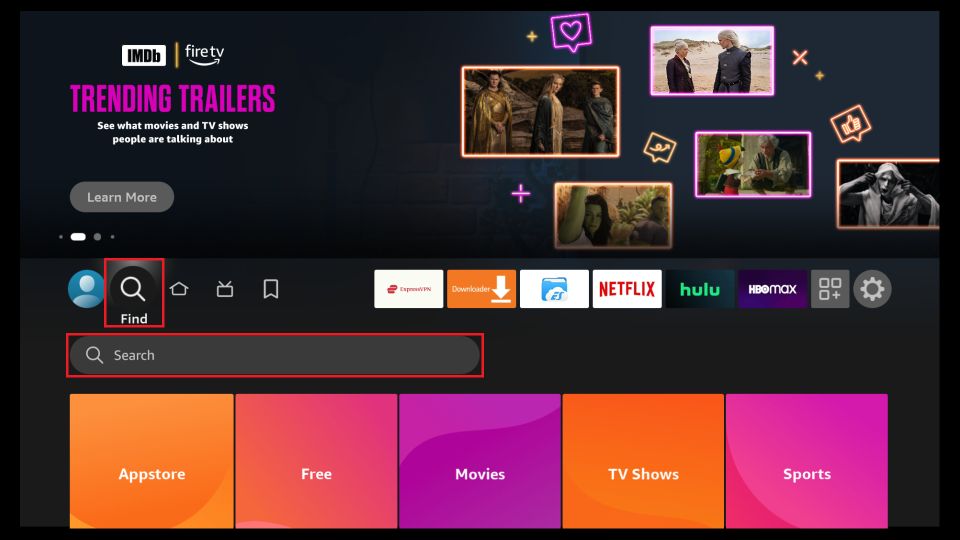
Step 2: Power on your Fire TV Stick and go to Find, then select the Search option.
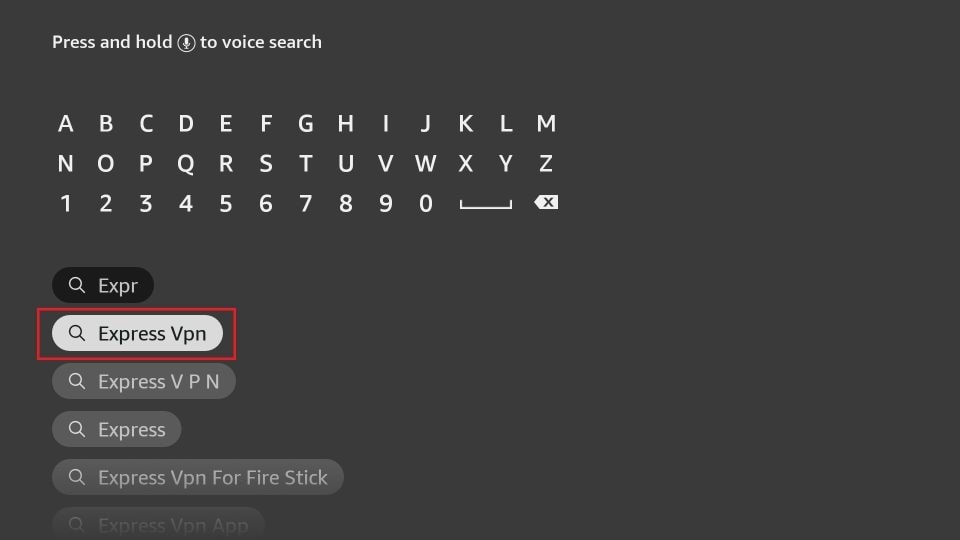
Step 3: Now type Express VPN in the search bar and select Express VPN when it appears in the search results.
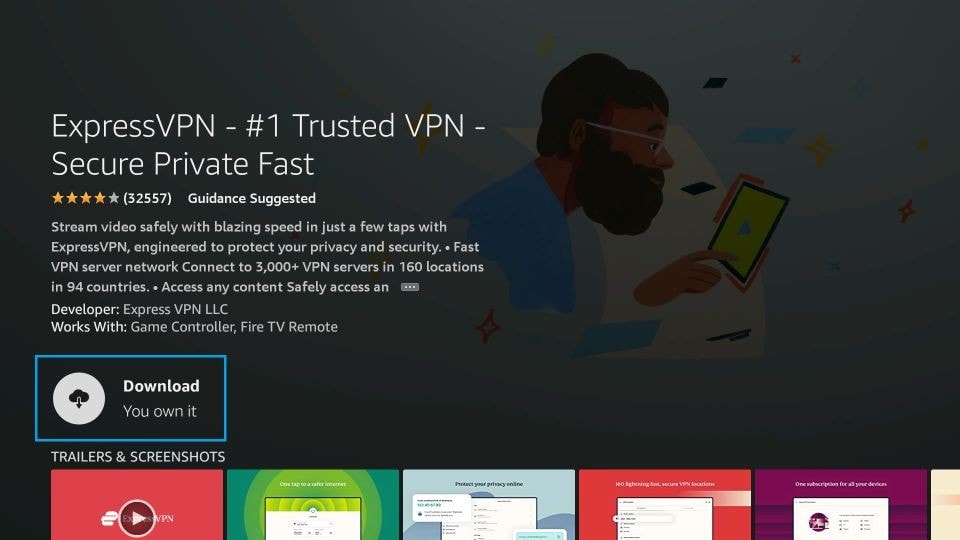
Step 4: Click Download or Get to install the ExpressVPN app on Fire TV / Stick.
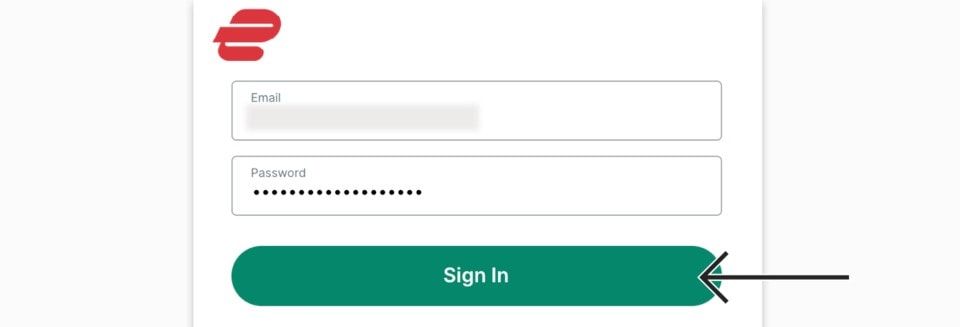
Step 5: Open the app and enter the login credentials you created when buying the ExpressVPN subscription. Then, click Sign in.
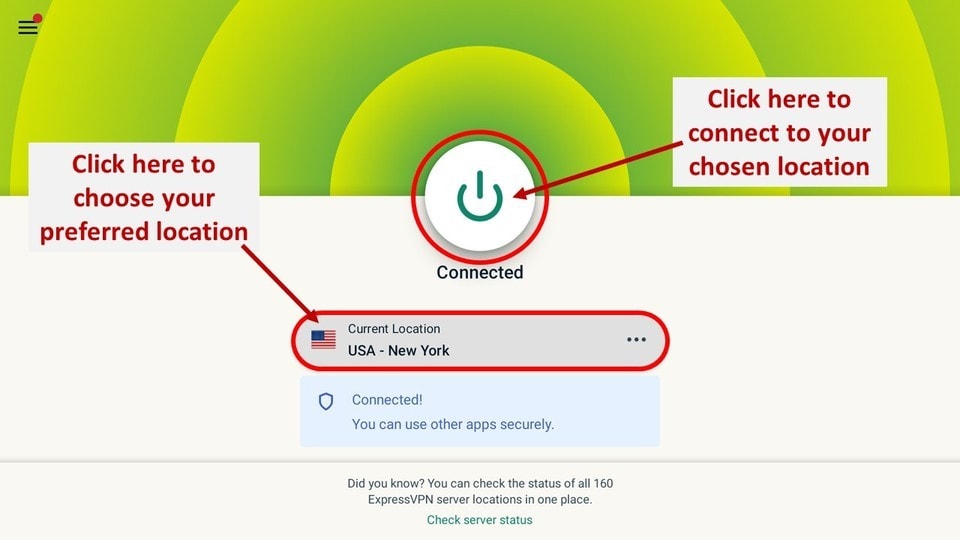
Step 6: Click the Power icon to connect to a VPN server. That’s all. Your connection is now secure with the fastest and best VPN for FireStick.
You can also read more detailed info on ExpressVPN with Fire TV / Stick.
2. Downloader

Once you’ve jailbroke your FireStick, you need a downloader app to sideload third-party apps from external sources. The Downloader app is an official app from the Amazon App Store that lets you install other apps on FireStick.
The app fetches the APK file of an app from the web. Once the file has been downloaded, you can install it. The process takes a few moments, allowing you to install third-party apps on your device quickly.
In a nutshell, using the Downloader entails the following:
- Enter the app installation URL in the search bar.
- Download the APK file.
- And install the application on FireStick.
How to Install Downloader on FireStick
3. Kodi

Kodi is inarguably the most popular jailbroken FireStick app. The digital media player provides all your entertainment needs in a single platform.
You can install special plugins called Kodi addons to stream movies, live TV, TV shows, music, and more.
The app was initially available on the Amazon App Store. However, to the disappointment of many users, Amazon removed it from the store in 2015.
With a jailbroken FireStick, you can easily install Kodi using the Downloader app.
4. IPTV Players

Internet Protocol Television (IPTV) has become a popular alternative for streaming live TV and on-demand content. While some IPTV providers have apps for streaming their content, some depend on third-party apps made for IPTV services, called IPTV players.
IPTV Players does not host or stream any content itself. Instead, they play the content provided by your IPTV provider.
An IPTV provider offers live TV and on-demand content for a small fee. To access the content, you must subscribe to the service. The provider will send you login credentials, which you’ll use to log in and stream content.
5. Mouse Toggle

Most FireStick apps work seamlessly with the Fire TV remote. However, some third-party apps, especially those not designed for a TV screen, may fail to work with the remote due to compatibility issues.
Mouse Toggle is a third-party app that helps you navigate such apps. The app introduces a mouse cursor on the Fire TV screen, letting you maneuver through sections and access various app functions.
How to Install Mouse Toggle on FireStick
6. Silk Browser
 The FireStick not only provides content through various apps but also lets you access websites that stream content such as movies, TV shows, live sports, and live TV.
However, you can access these sites only through a browser. One such browser is Amazon’s Silk Browser, which is the default browser for accessing the internet on Fire TV devices.
It is specially designed for Fire TV, Kindle Fire, and Fire smartphones. With a user-friendly layout and minimal design, Silk Browser is great for browsing on FireStick.
You can even bookmark your favorite sites for quick access.
Silk Browser comes pre-installed on most FireSticks. If not, you can manually install it from the Amazon Store.
7. VLC Media Player
 VLC Media Player needs no introduction. It features open-source software and is ranked among the top media players.
The Player works seamlessly with many jailbroken FireStick apps to play media on FireOS devices. It’s free and supports most video and audio formats, as well as streaming protocols.
The VLC Media Player also features its own media library for audio and video files. You can easily access the library via Fire TVs or FireSticks.
The VLC Media Player application is also officially available on the Amazon Store, so downloading and using it should be easy.
How to Install VLC Media Player on FireStick
Wrapping Up
The apps mentioned above are the best choices for a jailbroken FireStick. These apps will help you set up and stream various content on your device. They range from utility apps that let you safely and conveniently stream content to entertainment apps for streaming movies, TV shows, and live TV.
Frequently Asked Questions
A: Jailbroken Firesticks are entirely legal. You aren't modifying the system code on a FireStick. However, consuming illegal content on a jailbroken FireStick may expose you to legal troubles.
A: With a jailbroken FireStick, you can install official Kodi addons that let you watch a wide range of content. This includes movies, TV shows, live TV, sports, anime, cartoons, music videos, and adult content.
A: No, Netflix isn't free with a jailbroken FireStick. It's a lie if someone promises a lifetime Netflix subscription with a jailbroken FireStick.
A: We can't pinpoint any movie app as the best; they all offer diverse features. However, some fantastic legal applications for watching your favorite titles include Tubi, Xumo, Kodi, and more.
A: Yes, you can quickly turn your TV into a smart TV by connecting streaming devices like FireStick.

Suberboost Your FireStick with My Free Guide
Stay Ahead: Weekly Insights on the Latest in Free Streaming!
No spam, ever. Unsubscribe anytime.





Leave a Reply