
A recent update to the HBO Max streaming app has dropped support for older Fire TV devices running Fire OS version 5 and below. Read on to understand how this affects you.
Older FireStick models, such as the Fire TV Stick (2nd generation), run Fire OS 5, and many people still use them today. If you watch HBO Max on an older Amazon Fire TV Stick, this could affect you. It’s worth checking your Fire TV software version to confirm whether you’re impacted.
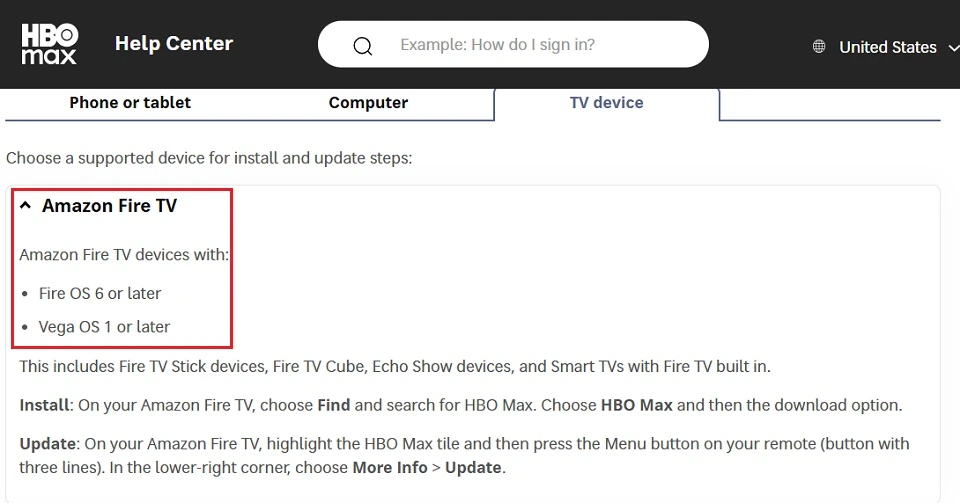
HBO Max Now Requires at least Fire OS 6 to Run on Fire TV Devices
HBO Max quietly dropped support for Fire TV devices running Fire OS 5 and below. According to the company’s support page, its Fire TV app now only supports Amazon Fire TV devices running Fire OS 6 or later and Vega OS 1 or later.
You may be wondering: Amazon releases software updates regularly, right? And if you keep your Fire TV updated, you should be safe.
That is only partly true.
Amazon does provide regular software updates for Fire TV devices. However, these updates are usually focused on new features, security patches, and bug fixes.
The company rarely upgrades the core Fire TV operating system version. Most Fire TV devices remain tied to the OS version they originally shipped with.
For example, if your Fire TV device runs Fire OS 5, it is very unlikely to receive an upgrade to Fire OS 6 or later. In most cases, the device will stay on that core OS version throughout its lifespan because major OS upgrades are generally not rolled out to older hardware.
The Fire TV Stick (2nd generation), which launched in 2016 with Fire OS 5, is one example of a device affected by this limitation.
Amazon has not released any official public figures showing how many Fire TV devices are still running Fire OS 5. However, since millions of Fire TV devices have been sold worldwide, many users could still be affected.
For FireStick Users
ISPs, hackers, and other third-party entities worldwide may monitor your online activities. For security, privacy, and smooth streaming, it is recommended to use a reliable VPN for FireStick. Your IP address is visible to sites you visit.
I recommend ExpressVPN, a fast and secure VPN. It is very easy to install on any device, including an Amazon Fire TV Stick. Also, it comes with a 30-day money-back guarantee. If you don't like their service, you can always ask for a refund. ExpressVPN also has a special deal where you can get 4 months free and save 81% on the 2-year plan.
Read: How to Install and Use the Best VPN for FireStick
What It Means For You
HBO Max’s recent update means you can no longer use the HBO Max app on any Fire TV device running Fire OS 5. To continue streaming your favorite TV shows and movies, you will need to upgrade to a device running Fire OS 6 or later.
Limited support for older software versions is one of several reasons some users consider moving away from Fire TV devices. Amazon has also indicated that future Fire TV devices will run a new Linux-based operating system known as Vega OS.
For some users, this could be a concern, especially if features like sideloading are restricted. However, most official apps, including HBO Max, are typically available through the standard app store on supported devices. Sideloading is usually only necessary in specific situations, such as regional restrictions or compatibility issues.
How to Check If Your Device is Affected
Are you worried that your device could be affected? Follow these steps to verify your Fire TV device’s software version:
1. Navigate to Settings from your Fire TV home screen.
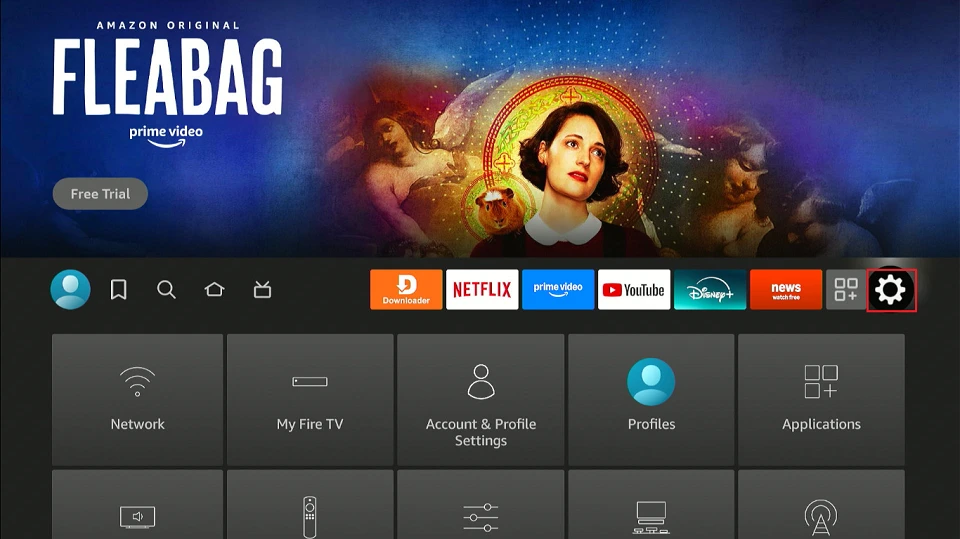
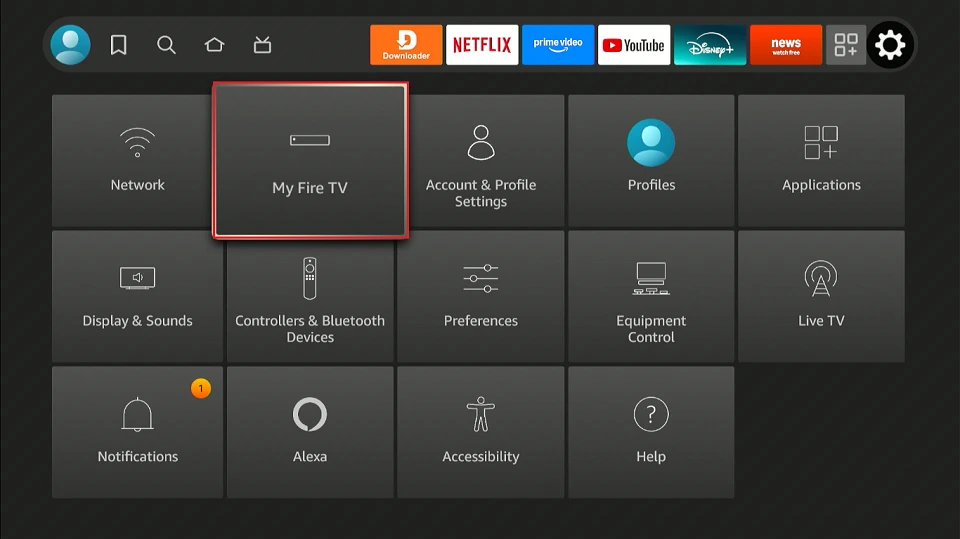
2. Select My Fire TV.
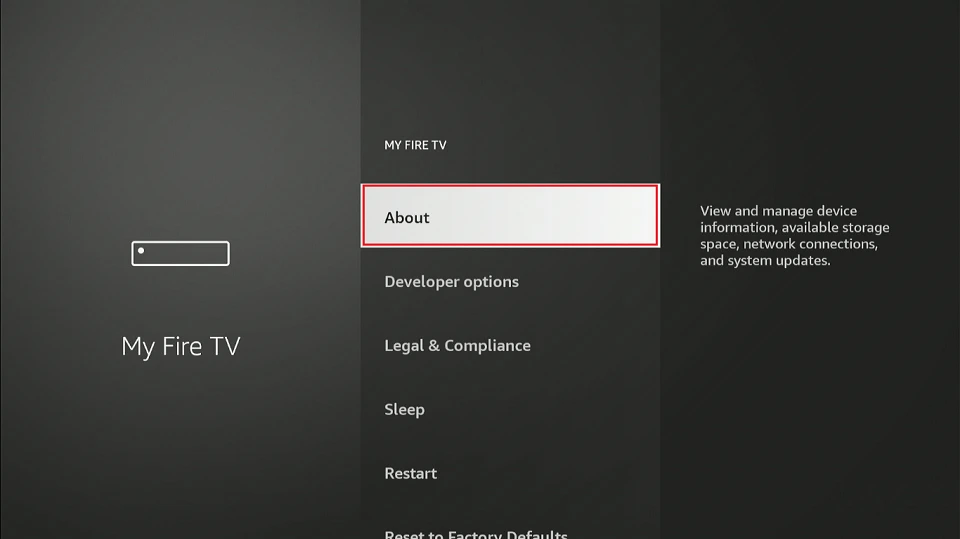
3. Click About.
4. Select Fire TV (this will depend on your model, e.g., Fire TV Stick 4K).
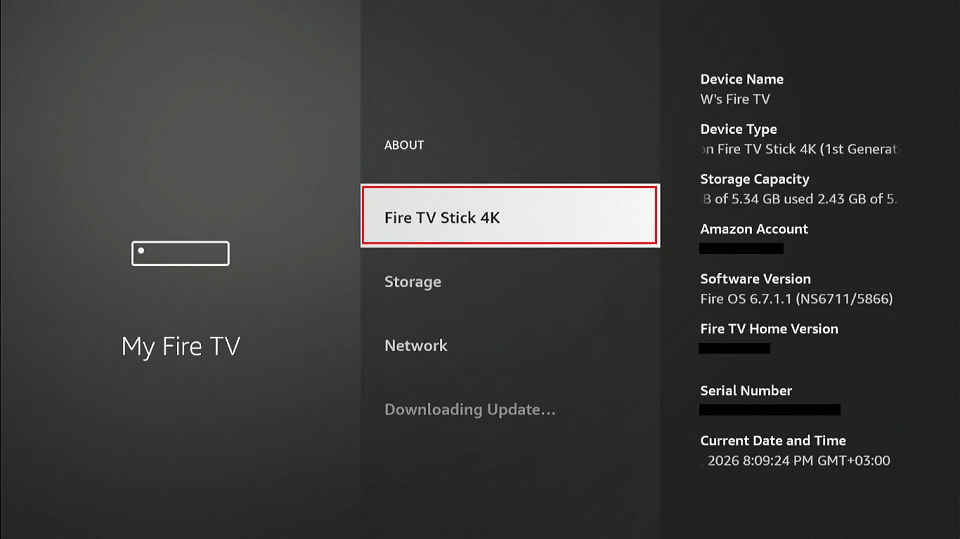
5. Go to Software Version. You should see Fire OS X.X.X.X (XXXXXXX).
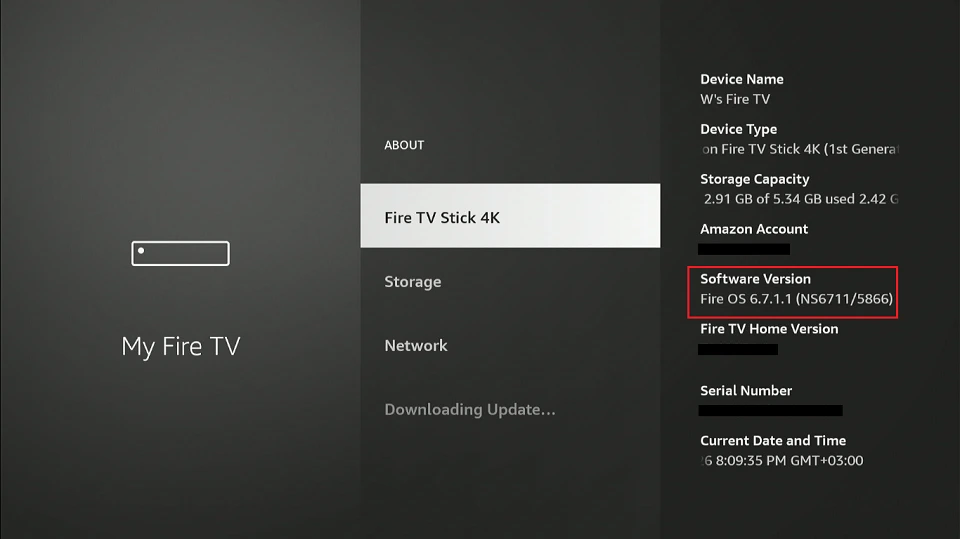
If your software version is Fire OS 5.X.X.X or earlier, you’re affected.
A Growing Trend
HBO Max is not the first major streaming service to drop support for older software versions. Disney+ also requires Fire OS 6 or higher for Fire TV devices.
Streaming services often phase out support for older software to reduce maintenance costs, improve security, and take advantage of modern features.
I understand that it can be frustrating to replace a functioning device simply because it is no longer supported by your favorite streaming service.
While Netflix and Prime Video still support many devices running Fire OS 5, there is a growing trend among streaming services to drop support for older software versions. For example, Netflix has discontinued support for some older TVs, particularly those with outdated hardware or software.
This trend indicates that older devices are becoming obsolete for modern streaming, and you might need to upgrade to continue accessing some platforms.
Are There Workarounds?
There are only a few workarounds available if you are affected. However, I recommend upgrading your device if possible so you can continue using HBO Max with improved performance and access to new features that enhance the streaming experience.
If buying a new Fire TV device is not an option, you can try sideloading the HBO Max app instead of installing it directly from the Amazon Appstore. While some users report playback and performance issues, the app may still work on certain devices even though it is not officially supported.
Another option is to use Kodi on your Fire TV device to access HBO Max content through the HBO Max Kodi addon. However, the addon is not officially supported by HBO Max, and its availability, stability, and performance may vary.
Lastly, you can still watch HBO Max by casting content from a supported device using Chromecast or AirPlay. In this setup, your phone, tablet, or laptop handles the streaming while the TV simply displays the content over the same Wi-Fi network. It can be a useful workaround if the app is unsupported on your Fire TV device, although the experience depends on your connection quality and device compatibility.
Wrapping Up
Older FireTV Sticks are gradually losing support for major streaming apps. HBO Max and Disney+ have already dropped support for Fire TV devices running Fire OS 5 and below. If you are using an older Fire Stick, it may be time to upgrade your device or switch to an alternative streaming platform.
Even if your older device still works, app incompatibility may affect how you stream your favorite content. Is your FireStick affected by this change? Let us know below in the comments section.

Suberboost Your FireStick with My Free Guide
Stay Ahead: Weekly Insights on the Latest in Free Streaming!
No spam, ever. Unsubscribe anytime.




