
In this guide, I discuss the best Showbox alternatives for free movies and TV shows. These apps work on most popular devices, including FireStick, Roku, and Android TV, and some are also available on laptops.
What Was ShowBox?
ShowBox was a streaming app that offered free movies and TV shows. However, it was an unofficial application and lacked the licenses required to distribute copyrighted content.
ShowBox claimed that it did not host any videos directly and only fetched publicly available links from free servers worldwide.
Even though the app did not host the content itself, it still facilitated access to unauthorized streams and therefore operated in a legal gray area. Authorities eventually shut it down.
Below, I have listed some of the best ShowBox alternatives. All the options included in this post are legal, official, and safe to use.
Read before you continue.
ISPs, hackers, and other third-party entities worldwide may monitor your online activities. For security, privacy, and smooth streaming, it is recommended to use a reliable VPN. Your IP address is visible to sites you visit.
I use ExpressVPN, a fast and secure VPN in the industry. It is very easy to install on any device, including Amazon Fire TV Stick, Smartphones, PC, macOS, iOS, and more.
It comes with a 30-day money-back guarantee. If you're not satisfied with their service, you can always ask for a refund. ExpressVPN also has a special deal where you can get 4 months free and save 73% on the 2-year plan.
8 Best Showbox Alternatives That I Use Myself (Updated Aug 2026)
Here are the options:
1. Tubi
Tubi is an over-the-top streaming service by the Fox Corporation. It is one of the leading free, ad-supported streaming television (FAST) services, a growing streaming model in the US and beyond. Users get free content, and in exchange, the platforms get ad revenue.
Tubi has over 100 million monthly active users as of June 17, 2025.
You can stream over 200,000 on-demand movies and TV shows on Tubi, as well as over 250 live TV channels. Tubi has also started producing Tubi Originals in association with major Hollywood studios and stars.
The content library is constantly updated to provide new titles to millions of users who trust Tubi for their entertainment. You can find a wide variety of genres here, including action, drama, horror, mystery, fantasy, sci-fi, animation, and romance.
How to Install Tubi on FireStick
2. Pluto TV

Pluto TV is a competitor to Tubi and is owned by Paramount Global. It is a solid Showbox alternative, offering a large library of free movies, TV shows, documentaries, and animated content.
The platform also includes a live TV section with more than 250 US channels. Available categories include sports, news, comedy, kids and family, music, reality TV, and religious programming.
Pluto TV is available on multiple devices, including Android TV, Android mobile, iOS, and Fire TV. You can also watch it on any device with a web browser through its web player.
You don’t need an account to stream on Pluto TV. However, signing up gives you perks like personalized recommendations and the ability to sync your history across all devices.
How to Get Pluto TV on FireStick
3. Plex

Plex is a media manager that lets you organize your local files, such as videos, music, and photos. But it goes beyond that.
A while back, Plex introduced a FAST service that offers users movies, TV shows, and live TV at no extra cost. This service is accessible to everyone, even unregistered users.
It is one of the ad-supported streaming services with the widest library. Plex offers over 1000 free channels from around the world.
The number varies by region. For instance, US users can access up to 600 channels across the genres of movies, TV shows, sports, news, kids and family, lifestyle, travel, and outdoor.
The on-demand section offers over 50,000 free movies and TV shows.
How to Install Plex on FireStick
4. The Roku Channel

The Roku Channel is another Showbox alternative for free movies and TV shows.
Like its predecessors on this list, it’s a FAST service that offers free live TV and on-demand content.
The free channels include news, movies and shows, music, lifestyle, travel, comedy, and cooking channels, mainly from the US.
On the other hand, the on-demand section features popular Hollywood hit movies, classic TV shows, beloved 90s shows, and Roku originals. There are over 80,000 titles to choose from.
The Roku Channel is available officially on most app stores. You can install it on your smart TV, Android TV box, FireStick, smartphone, gaming console, etc.
How to Watch The Roku Channel on FireStick
5. Kodi

Kodi is an open-source media player that lets you watch movies, shows, live TV, sports, and other video content via Kodi addons.
There are tons of free and official addons, such as Tubi and Pluto TV.
Kodi is easy to install. However, it may take some time to get used to it.
Nevertheless, it is a decent replacement for Showbox.
How to jailbreak a FireStick with Kodi
How to Use Kodi – Beginners Guide
6. Fawesome

Fawesome is another free streaming app that’s 100% legal and safe. You can stream thousands of free movies and TV shows on this app. Featured genres include horror, crime, sci-fi, drama, mystery, documentaries, westerns, and black cinema.
I found some popular titles here, such as The Diplomat, The Return, and Merlin. Navigation is easy in this app. You can find something to watch using the genre filters or search for specific titles.
Like most free legal apps, Fawesome is ad-supported.
How to Install Fawesome on FireStick
7. Xumo Play

Xumo Play is an ad-supported streaming service that offers free live TV and on-demand content. It features more than 350 free channels covering news, movies, TV shows, kids’ programming, comedy, sports, music, and more. The on-demand section is also quite extensive, with over 15,000 free titles available to stream.
While it may not be the perfect ShowBox replacement, it is still worth considering if you are looking for free movies and TV shows. The service is ad-supported and completely free to use, even without creating an account.
Xumo Play is available on a wide range of devices, including smart TVs, smartphones, TV boxes, and gaming consoles. You can also stream it on any computer through the built-in web player on the Xumo Play website.
How to Get Xumo Play on FireStick
8. YouTube (Movies & TV)

YouTube started as a video-sharing platform, but over the years, it has become one of the go-to places for free movies and shows. You can find a diverse range of content here, including indie films and Hollywood favorites.
I prefer using the main search bar to find full movies from around the world, including foreign-language titles with English subtitles. However, if you are looking for mainstream films and TV shows, you can use YouTube’s Movies & TV section.
This section also lets you rent and buy premium movies. However, its availability varies by region. I was able to access the section using a US VPN server, so I recommend using one if you can’t find it in your location.
How to Stream on FireStick with a VPN
Your internet provider and many websites/apps can see your IP address and some details about your connection. Using a VPN encrypts your traffic and masks your IP address, which helps protect your online privacy.
I recommend ExpressVPN. It’s a reputable VPN with strong encryption and fast connections, and it’s straightforward to install on Fire TV/FireStick and other devices.
Next, I’ll show you how to set up and use ExpressVPN on your Fire TV/Stick.
Step 1: Subscribe to ExpressVPN HERE. It comes with a 30-day money-back guarantee. Meaning, you can use it for free for the first 30 days, and if you are not satisfied with the performance (which is highly unlikely), you can ask for a full refund.
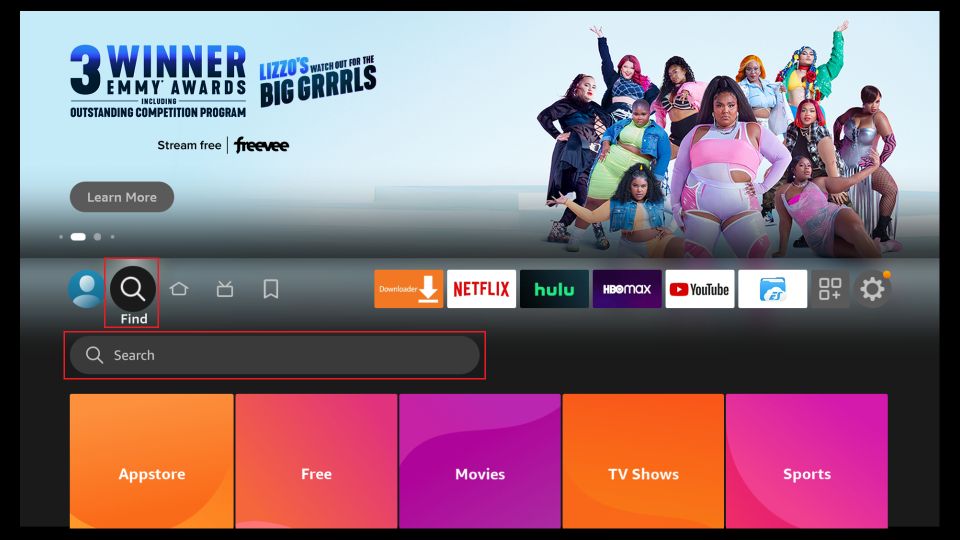
Step 2: Power ON your Fire TV Stick and go to Find, followed by the Search option.
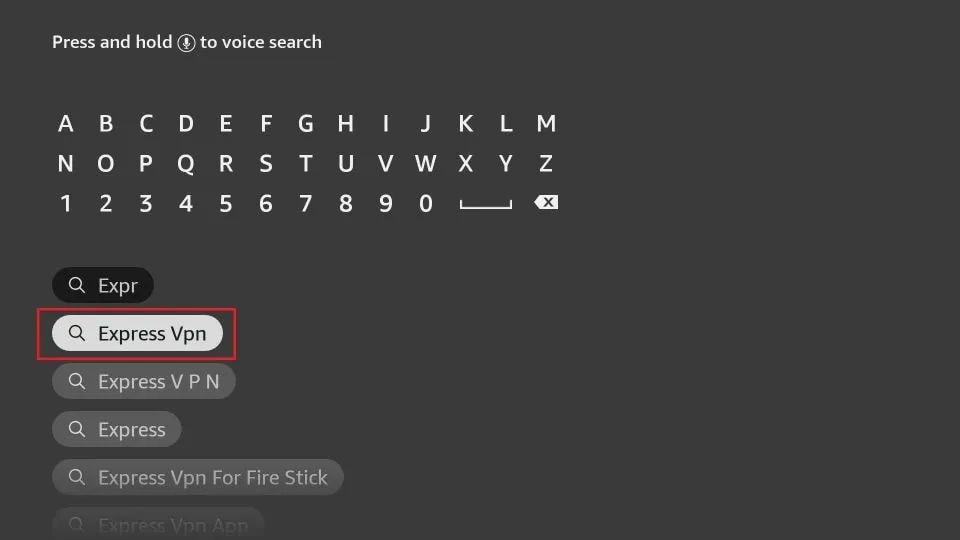
Step 3: Now type “Expressvpn” (without quotes) in the search bar and select ExpressVPN when it shows up in the search results.
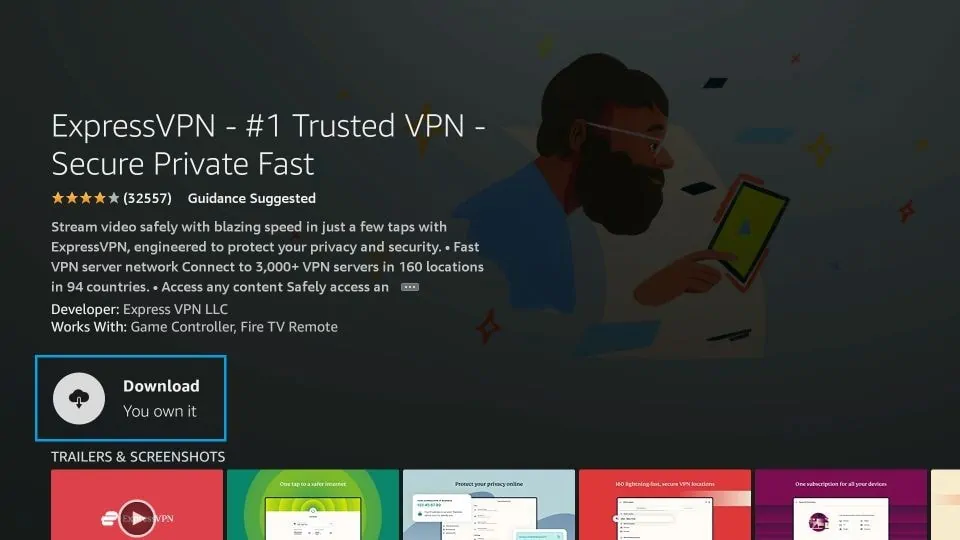
Step 4: Click Download to install the ExpressVPN app on Fire TV / Stick.
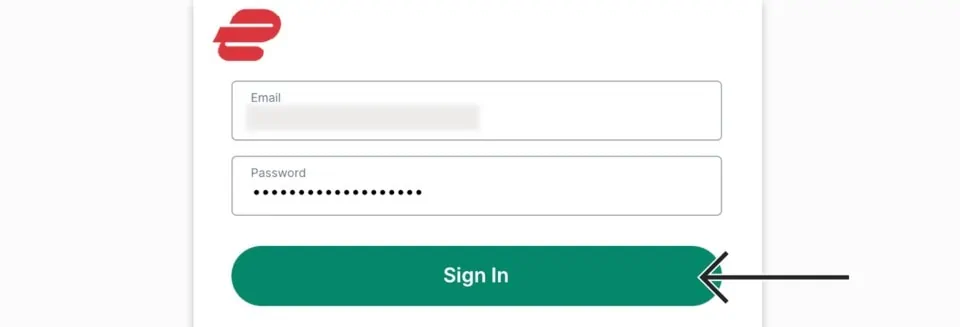
Step 5: Open the app and enter the login credentials that you created when you purchased the ExpressVPN subscription. Click Sign in.
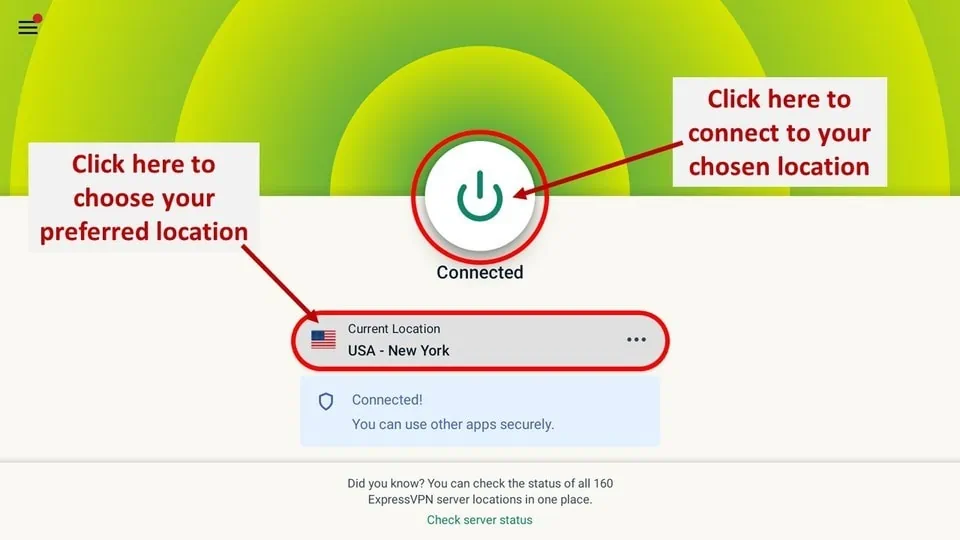
Step 6: Click the Power icon to connect to a VPN server. That’s all. Your connection is now secure with the fastest and best VPN for FireStick.
Wrapping Up
These are some of the best ShowBox alternatives available in 2026. After the app was shut down, many users started searching for reliable replacements. All the apps included on this list are free, legal, and safe to use. Through these platforms, you can stream movies, TV shows, documentaries, and more.
Have you tried any of these ShowBox alternatives? Feel free to share your experience in the comments section below.
Frequently Asked Questions
A: No. Showbox was shut down years ago because it streamed copyrighted content without licenses.
A: Yes. All the apps listed here, like Tubi, Pluto TV, and Plex, are legal and supported by ads.
A: No. Most of these services are completely free, though some also offer optional paid upgrades.
A: Yes. All the mentioned apps work on FireStick, smart TVs, PCs, and mobile devices.
A: No. Since these apps are legal and safe, a VPN is optional and mainly used for privacy.

Suberboost Your FireStick with My Free Guide
Stay Ahead: Weekly Insights on the Latest in Free Streaming!
No spam, ever. Unsubscribe anytime.





I think Cyberflix TV is a very good movie application that can replace other online movie applications at https://techuptip.com/cyberflix-tv/
Can any of your suggested alternatives be used with chromecast. Many thanks
Hi Bill, third-party apps usually do not support Chromecast
I have been a user of Cinema app for a year now but what bugs me I use the search method to find movies by subject matter. But when the list appears they may are may not show links but only about 10% of the listed movies can be seen. This really bugs me as a waste of time involved in going through a meaningless listing. Would you know the answer.?