In this post, we will discover the best free VPNs for Kodi. The VPNs mentioned in the article work with any Kodi-compatible device, such as FireStick, Fire TV Cube, Android TV, Windows, Mac, iOS, Android Smartphones, Raspberry Pi, and Linux.
Using a free VPN for Kodi appeals to those who want to protect their online privacy without spending on expensive options.
While these VPNs can help mask your IP address and bypass geo-restrictions, they may pose risks, so you should assess them before using them.
Users typically avoid free VPNs, and for good reason. Free Kodi VPN providers are known for disregarding users’ privacy and security.
Free VPNs typically monetize by collecting and selling user data, undermining the purpose of using a VPN.
I have picked the best free VPNs for this post. However, their safety is not guaranteed.
While free VPNs offer temporary solutions, premium VPNs provide better security, faster speeds, and a more comprehensive feature set for Kodi users.
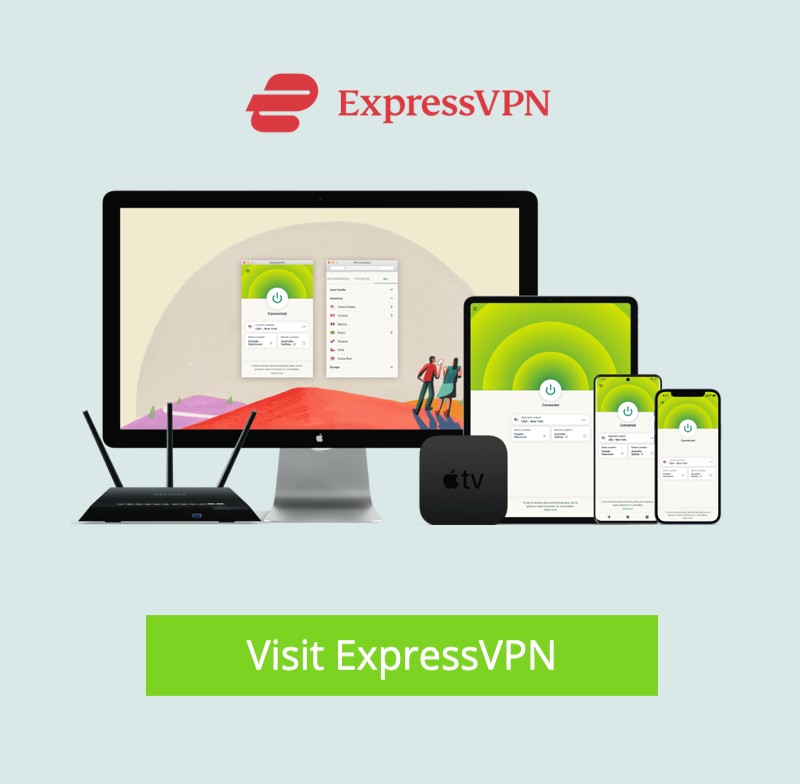
If you are considering a premium VPN, we recommend ExpressVPN. It’s not free but offers a 81% discount and 4 extra months on the 2-year plan. Furthermore, it offers a 30-day money-back guarantee, allowing you to try a premium Kodi VPN for 30 days at no cost.
If you are still not interested in paying for a VPN, we have listed the best free VPNs in this post. However, we cannot guarantee their safety.

Best for
Streaming and privacy
Servers
3000+
Money-back guarantee
30 Days
Supported Apps


Works with
Kodi, Torrenting, Netflix, Amazon Prime Video, Hulu, BBC iPlayer, Sky, HBO
Special Deal
4 Months Free (2-year plan)- VPN Servers in 105 Countries
- Super fast speed – great for streaming
- Strong no logging policy
- Very secure 256-bit encryption
- No Streaming restrictions
- Unlimited Bandwidth
- Network Lock (Killswitch)
- Unblocks Netflix and BBC iPlayer
- Safe for P2P and torrent use
- Dedicated apps & easy set-up on all devices
- 8 simultaneous connections
- Excellent 24/7 Live chat/email support
- Bitcoin accepted
- 30-day money-back guarantee
How To Pick the Best Free VPN for Kodi
Several factors help ensure the safety of a VPN. If you are considering getting a free VPN, review these factors before you choose:
Safety
Safety is one of the most crucial factors to consider when selecting the best free Kodi VPN. Most people use Kodi VPNs to stream content anonymously and protect their data from third parties.
A free VPN can also ensure hassle-free streaming. With proper safety mechanisms and advanced encryption protocols, you can also access and install any Kodi addons without worrying about data breaches.
No Logs Policy
Many free Kodi VPN providers have been accused of retaining their user data and selling it to advertising and data mining companies for profit. This has shaken people’s trust in free VPNs, especially those without a no-logs policy guarantee. Users are now more careful when choosing a VPN, opting for one with a clear no-logs policy.
When selecting a free VPN for Kodi, thorough research is essential to ensure the provider has a no-logs policy.
Features
Split tunneling, bandwidth limitations, security features, speed, and server locations are key considerations when evaluating a free VPN. Always select one with lots of features and flexibility.
Connection speed must also be considered for buffer-free Kodi streaming. It will determine which Kodi addons to use, as some require fast, reliable internet speeds.
Paid VPNs Vs. Free VPNs for Kodi
While a free VPN for Kodi masks your IP address and prevents third parties from accessing your data, it cannot provide the same level of security as a premium VPN. Premium VPNs charge a fee to ensure they deliver the best possible service without compromising your privacy or security.
This isn’t always the case with free VPNs. Many free VPNs are known for selling user data to the highest bidder to maintain operational costs.
Some advantages of paid VPNs over free VPNs include:
Better Safety and Security
Paid VPNs invest in military-grade security protocols and advanced encryption to ensure the highest level of privacy. This is not guaranteed with free VPNs, as most offer limited resources and data caps.
Additionally, free VPNs have been known to compromise users’ security by sharing their data with third parties. Premium VPNs, on the other hand, have a strict no-logs policy and regular and verifiable data audits.
Better Features and Flexibility
Paid VPNs offer a range of features depending on your subscription plan. They also provide more flexibility than free VPNs, as you can connect multiple devices, access hundreds of locations, and unlock several geo-restricted websites and services.
A premium Kodi VPN provides unlimited bandwidth and can unlock multiple streaming services, such as BBC iPlayer.
Faster Connection Speeds
Paid VPNs typically offer faster connection speeds than free VPNs. This makes them ideal for streaming content on Kodi, as they don’t experience lag or buffering.
How to Get a Premium Kodi VPN for Free
As mentioned earlier, premium VPNs offer numerous advantages and better security and privacy guarantees than free VPNs.
One of the best VPN providers today is ExpressVPN. This VPN service offers several advanced security features, 24/7 live chat support, and a 30-day money-back guarantee if you cancel your subscription.
Here’s how to get a premium VPN on FireStick to pair with Kodi:
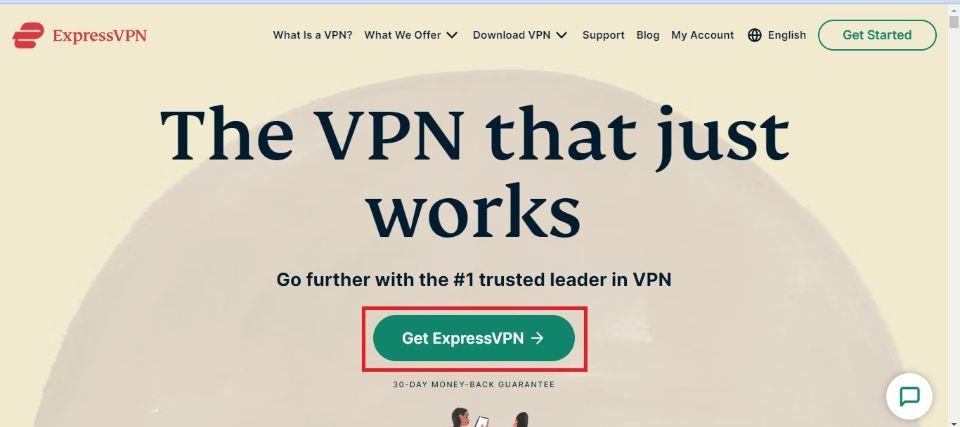
1. Go to the official ExpressVPN website and click the Get ExpressVPN button to subscribe to a plan.
2. I am using a FireStick to demonstrate the following steps. However, you can install ExpressVPN from the official app stores on most devices (including iOS and Android). Start your Fire TV and click the Search bar on the home page.
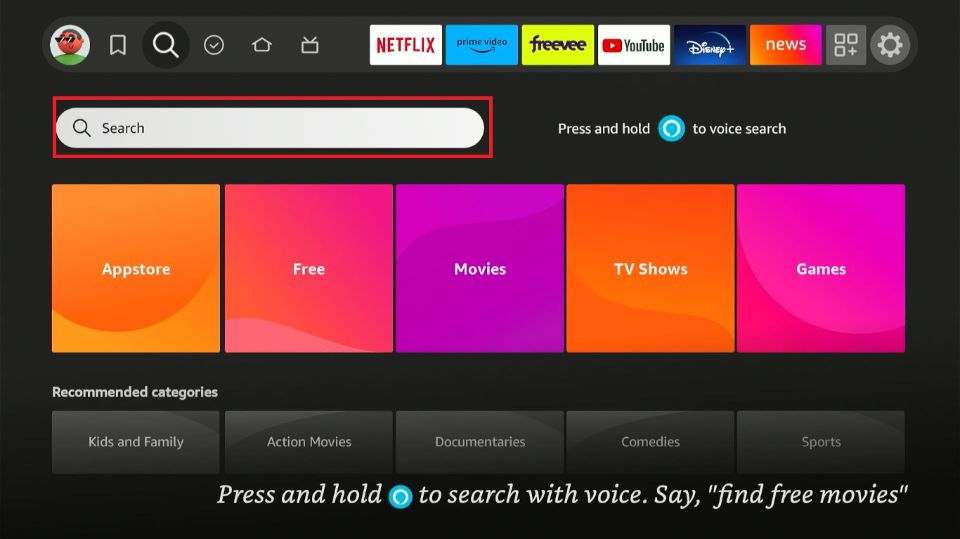
3. Type ExpressVPN and click on it from the search results.
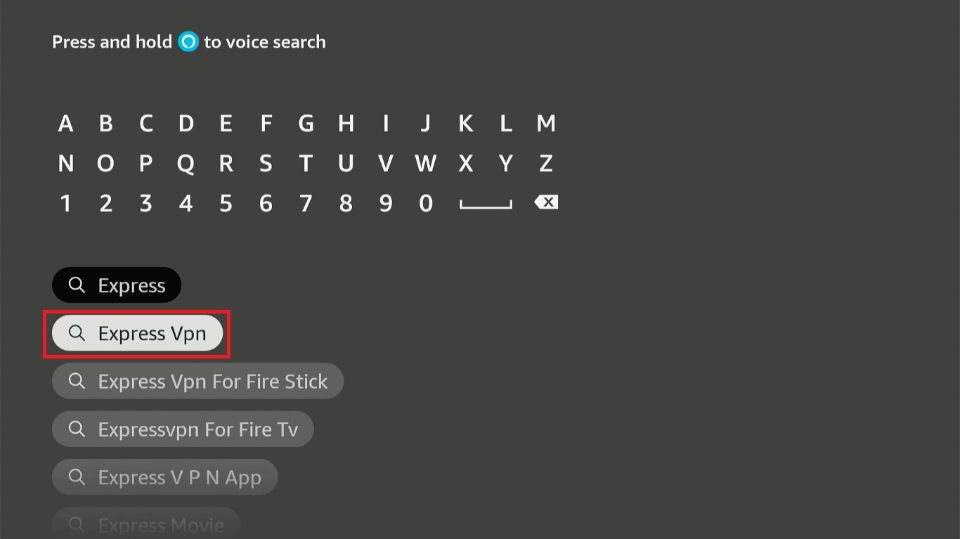
4. Find ExpressVPN tile under Apps and Games and select.
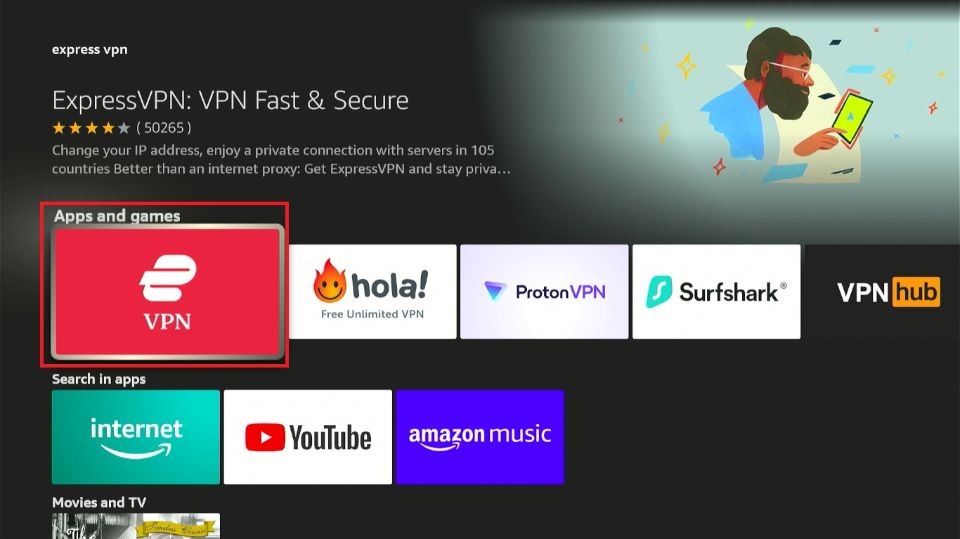
5. Click on the New User option.
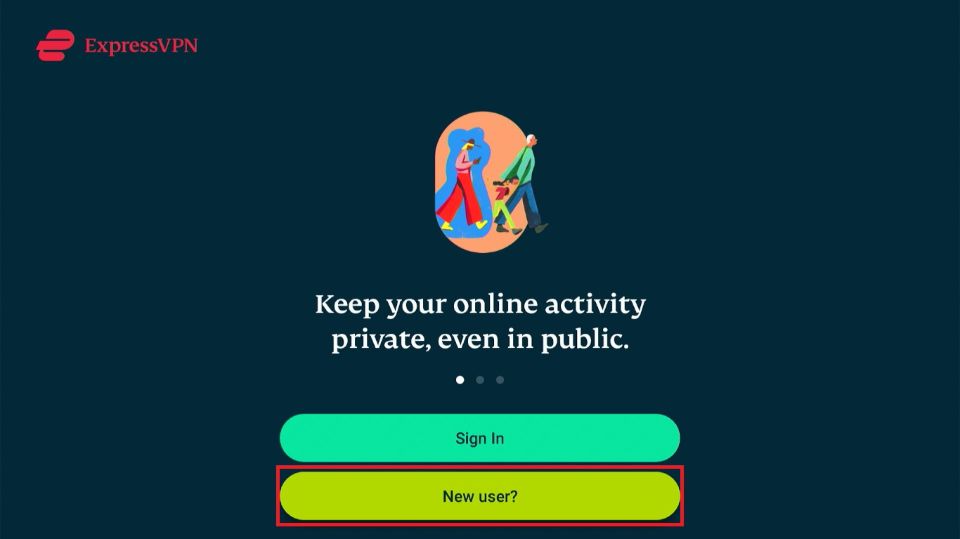
6. If you have already subscribed to a plan, click the Sign In button.
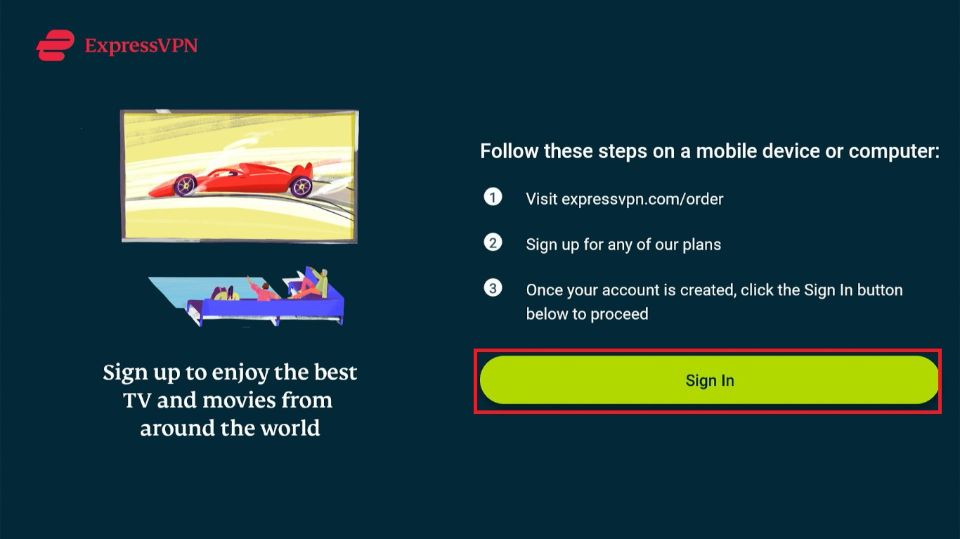
7. Click on Sign In with Remote in the next window.
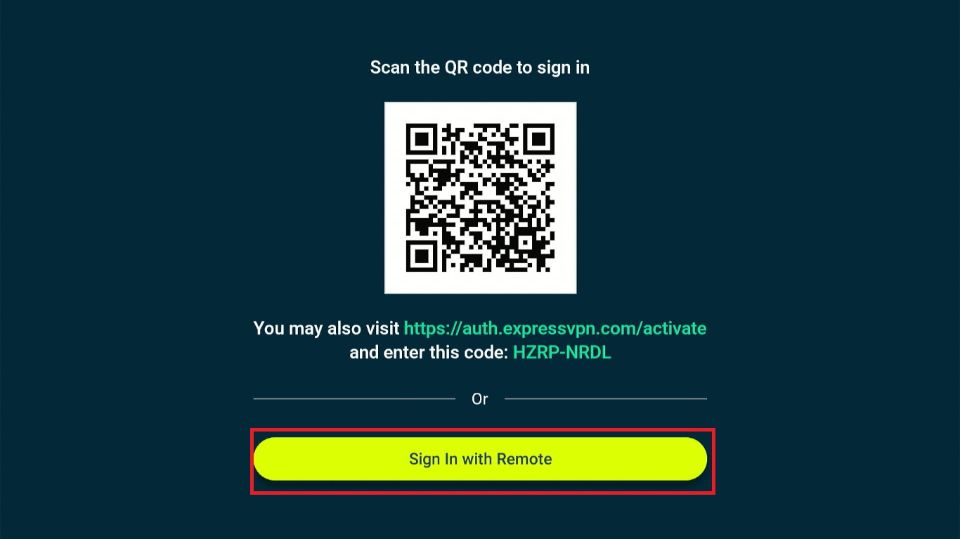
8. The app’s sign-in window will appear in a few seconds
9. Click OK on the following prompt.
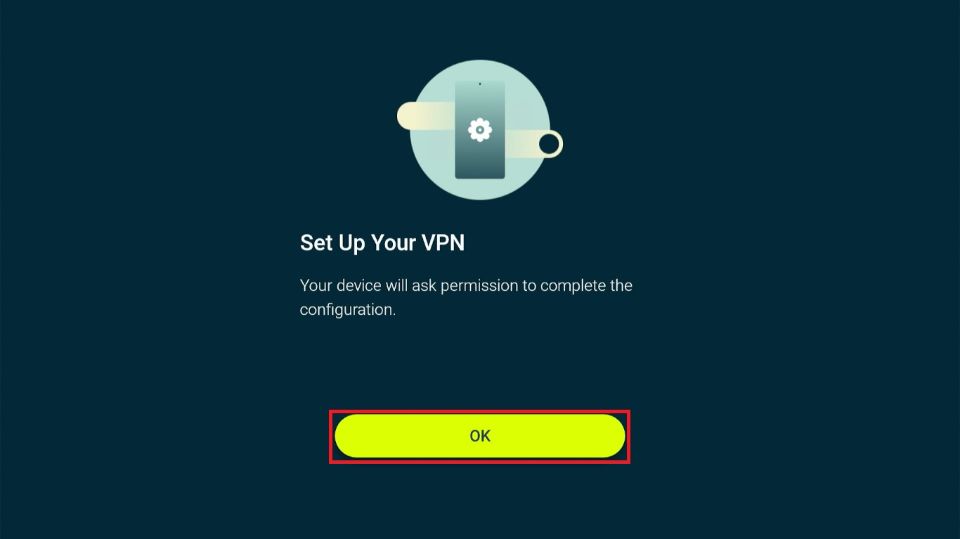
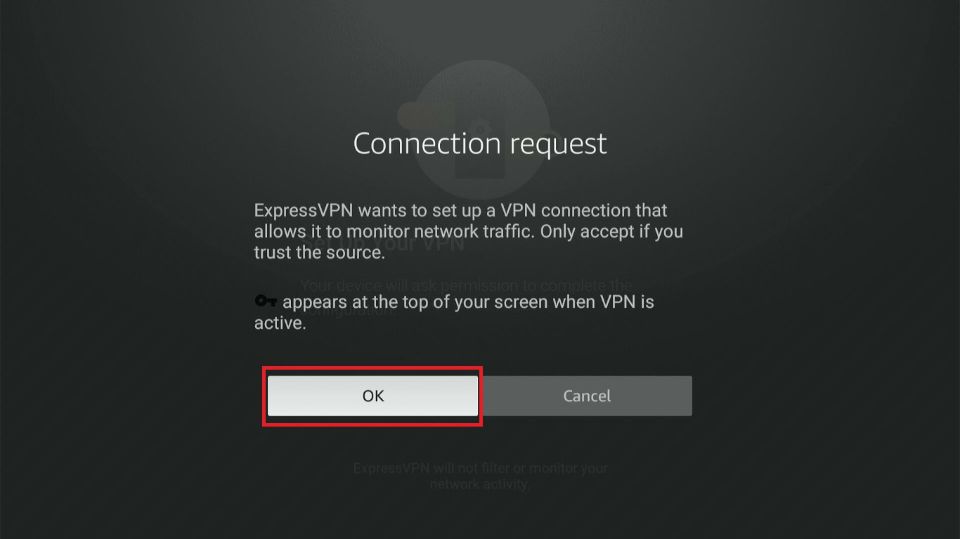
10. Click OK on the connection request.
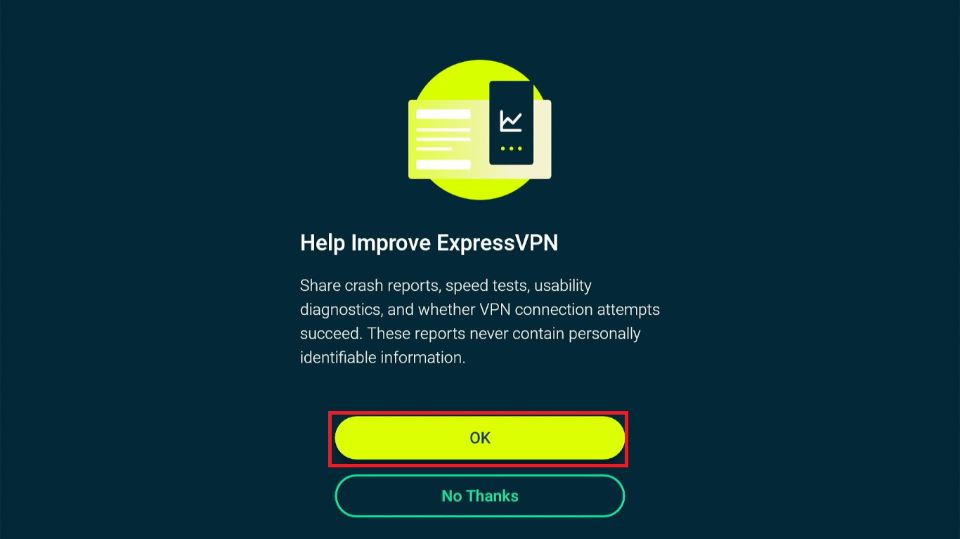
11. Select OK on the improvement pop-up. Select the most convenient location to connect to the VPN and start streaming on Kodi.
Best Free VPNs for Kodi
Free VPNs are suitable for short-term use. They can be convenient for concealing your identity when traveling or using public Wi-Fi. They cost nothing and are easy to use.
However, they can be risky and compromise your security over time.
A premium VPN is the best choice if you plan to use it for an extended period. Most premium VPNs offer various incentives, like a 30-day money-back guarantee.
However, if you still want to explore free VPNs for Kodi, here are some of the best options to check:
1. Hide.me
 Independently owned and operated, Hide.me VPN is one of the top free VPNs for Kodi. This VPN utilizes the latest Bolt technology to ensure fast connections from anywhere in the world.
Additionally, it secures your data from prying eyes and keeps you anonymous online by using advanced encryption.
In addition to its excellent speed, Hide.me VPN offers streaming-optimized servers well-suited for Kodi, BBC iPlayer, and other popular streaming services. Thanks to their streaming-optimized, globally distributed servers, you can stream your favorite movies and TV shows and access geo-restricted content.
Another notable feature of Hide.me VPN is its full support for IPv6, which enables faster, more reliable routing of internet traffic.
This free VPN service supports up to 10 simultaneous connections across Android, iOS, and Windows. It also supports torrenting and works with top P2P apps, which is rare for free VPNs.
Hide.me VPN has a massive network of over 2,500 servers in 85+ locations. It’s strict no-logs policy safeguards your data. It offers several privacy features, including SmartGuard, Split Tunneling, IP leak protection, and 10GB of data per server.
2. Hotspot Shield
 Hotspot Shield is another popular free VPN with decent features and advanced security protocols. It has over 1,800+ servers in 70+ countries.
Hotspot Shield’s free plan includes military-grade encryption and blocks over 57 million phishing and malware sites, providing strong protection against malicious software.
In addition to its robust security system, Hotspot Shield VPN uses the patented Hydra protocol to maintain your online anonymity, encrypt your data, and mask your IP address.
Hotspot Shield is not a completely free service. Instead, it offers a free trial that you can upgrade to the premium version to access exclusive features. These features include unlimited bandwidth and access to all server locations.
Hotspot Shield’s free version supports up to 5 simultaneous connections and is compatible with popular platforms such as macOS, iOS, Android TV, Windows, and Linux. This Kodi VPN offers fast connection speeds, making it ideal for streaming and downloading content on Kodi.
Additionally, it has a verifiable zero-log policy and a 45-day money-back guarantee for premium upgrades. Hotspot Shield also provides 24/7 customer support to address any issues you may encounter.
Using this free VPN provider on Kodi is relatively easy. Download and install the VPN onto your Kodi-compatible device. Open the VPN app and click the launch button to connect. Next, launch Kodi and start streaming your favorite content.
3. Windscribe
 Windscribe is one of the best free VPNs for Kodi. It supports multiple protocols, including OpenVPN, IKEv2, and WireGuard, to protect your data from malicious third parties.
It also provides a range of IP classifications to meet the needs of any VPN user. For example, data-oriented businesses can obtain data center IP addresses at 10 locations across Canada, the U.S., and Europe.
If you want a safe and secure home IP, you can get Windscribe’s residential IP addresses, while anyone who wants to reserve an exclusive port can opt for a static IP address.
Regarding speed, Windscribe delivers fast download and upload speeds, ideal for streaming movies and TV shows on various services and for using Kodi.
Other Windscribe VPN feature highlights include the vast server network covering 69 countries and 134 cities. This VPN service supports port forwarding, allowing you to access your internal resources remotely via your Local Area Network (LAN).
Additionally, it includes split tunneling, allowing you to choose which VPN tunnel to use for your internet traffic.
Windscribe offers a free adblocker and a strict no-logs policy. It is compatible with various devices and streaming platforms, including Amazon Fire TV iOS, Android, and Linux. You can upgrade to Windscribe’s premium version to get unlimited bandwidth for your VPN connection.
4. Proton VPN
 If you’re looking for an easy-to-use VPN for Kodi with advanced security features and excellent speeds, Proton VPN won’t disappoint. Proton VPN is headquartered in Geneva, Switzerland, a country with strong data protection policies.
The country’s data protection policy enables the VPN to maintain a secure no-logs system, protecting your browsing history and personal information.
In addition to data protection, Proton VPN offers high-speed servers up to 10 Gbps, making it one of the best free VPNs for Kodi. Proton VPN allows you to browse anonymously using NetShield, a DNS filter that blocks ads, malware, viruses, and third-party trackers.
Regarding security protocols, the free version of Proton VPN uses a unique Stealth protocol with superior firewall bypassing capabilities. This protocol enables Protocol VPN users to access geo-restricted content and bypass censorship firewalls.
It also helps route your Kodi traffic and unblock premium services, such as BBC iPlayer and Amazon Prime Video, from anywhere.
Proton VPN also offers an accelerator that can increase your connection speed by up to 400%. Fast speeds are crucial when selecting a free VPN for Kodi, as speed directly impacts the stability and quality of the streaming experience.
Other highlights of Proton VPN include a vast server network of over 11,000 servers in 117 countries, DNS Leak protection, full-disk encryption, and compatibility with popular devices and platforms.
Proton VPN also offers robust security features that mask your IP address from third parties, including internet service providers and law enforcement authorities.
The software is compatible with various devices and streaming platforms, including Kodi, smart TVs, and Amazon Fire TV devices. It also works well on Android devices, including smartphones.
This VPN provider’s free version provides DNS leak protection and includes a kill switch in its Linux and Windows VPN apps.
5. PrivateVPN
 Unlike other free services, PrivateVPN offers a 7-day free trial with no restrictions, allowing users to test its services and features. This differs from other providers on this list, which instead offer free VPN services but with restrictions on specific features, such as servers and data.
Despite its different operating model, PrivateVPN offers features similar to those of other free VPNs. Its military-grade encryption shields users from third-party detection, including by the government or their Internet Service Provider (ISP).
Additionally, it delivers maximum speeds ideal for smooth Kodi streaming, downloading and uploading content, and browsing the internet.
PrivateVPN is easy to set up and use, and it works well with popular platforms, including iOS, Linux, Amazon Fire TV, Android devices (such as Android TV and Smart TV), macOS, and other streaming services.
PrivateVPN’s network of 200+ servers across 63 countries is smaller than those of the other Kodi VPNs on this list. However, it can still support private internet activities from several global locations.
Some notable PrivateVPN features include tailored VPN apps for various devices, advanced security, technology to unblock geo-restricted websites, and a kill switch to prevent data leaks when the VPN connection drops.
It has a strict no-logs system and a 24/7 live chat customer support team to resolve internet connectivity issues.
Why You Should Be Wary of Free VPN Services?
As we’ve established, it is essential to evaluate free Kodi VPNs carefully before using one. This is because free Kodi VPNs are known for selling user data to the highest bidder. Unlike premium VPNs, which prioritize data privacy, free VPNs have little incentive to protect your information. Due to their limited resources, they often rely on advertisements to support their free services.
Freemium options are best if you are still considering free Kodi VPNs. Freemium VPNs typically offer a limited free trial to allow users to test their services before upgrading to a paid plan. These options outperform most free VPNs and offer additional features, including access to premium streaming platforms like BBC iPlayer and Amazon Prime Video.
Still, you should use a free VPN for Kodi only when necessary, such as when traveling, using public Wi-Fi, or browsing privately for a limited period.
Best Premium VPN Services
Choosing a premium VPN service includes accessing security protocols, available features, pricing, and server networks.
Here are some of the best premium VPN services you can use for Kodi:
1. ExpressVPN
 ExpressVPN is a tried-and-tested VPN provider with a vast server network across 105 countries. This VPN provides a high-speed connection and optimized servers to meet a range of needs, including streaming and advanced security protocols.
This VPN provider is headquartered in the British Virgin Islands, a location that enforces strict data privacy laws. This means you can trust this VPN’s no-log system. In addition to its zero-logs policy, ExpressVPN offers valuable in-app features such as a password manager to store and access your logins, a tracker, and ad blockers.
Other outstanding features include AES-256 and Lightway encryption protocols, which provide a more reliable, seamless privacy experience. It also has a private DNS on every server for better data security, a kill switch, and split tunneling.
ExpressVPN supports up to 8 simultaneous connections and is compatible with various streaming platforms, including Amazon Fire TV, iOS, Android, Windows, and Linux.
You can subscribe to any available monthly or yearly plans. All plans have a 30-day money-back guarantee.
2. IP Vanish
 If you’re looking for a versatile, secure premium VPN with top-tier security features and a global server network, IPVanish should be on your list.
This VPN utilizes the highly rated WireGuard protocol to ensure secure online activities while maintaining fast connection speeds.
In addition to WireGuard, IPVanish uses additional advanced security measures to block intrusive ads and malicious websites. This VPN also monitors and blocks online trackers to ensure a seamless and anonymous browsing and streaming experience.
Another standout feature of IPVanish is the kill switch, which protects your data and IP address when your VPN connection drops. It also offers split tunneling to manage your online traffic more appropriately.
IP Vanish is ideal for families, offering unlimited bandwidth and device connections. Additionally, it offers advanced geo-unblocking capabilities that allow you to stream content from websites typically unavailable in your location.
IPVanish doesn’t store browsing data and is compatible with all major streaming platforms and devices. It offers several affordable subscription plans and a 30-day money-back guarantee.
3. PIA (Private Internet Access)
 PIA is another renowned premium VPN with lightning-fast speeds and a huge server network.
Like ExpressVPN, PIA uses the top-rated AES-256 encryption to ensure your data is unreadable to anyone who intercepts it.
This VPN doesn’t track, record, or sell your data and is dedicated to maintaining your online privacy through highly advanced security features. PIA VPN works well with all popular platforms and devices, including Android, smart TVs, mobile devices, and PCs.
One of the most notable qualities of PIA VPN is its unlimited bandwidth and device connections. You don’t have to worry about slow speeds while streaming content on Kodi and connecting to other devices. Additionally, PIA has split tunneling, ad blockers, and malware blockers, an advanced kill switch, and DNS leak protection.
Other add-on features include a dedicated IP address in case there’s a risk of IP blacklisting, a corporate VPN for organizations that want to secure their employee’s online activities, and an antivirus to detect and remove any malware.
PIA supports torrenting and has several flexible subscription plans to suit any user. Like other premium VPNs, PIA has a 30-day money-back guarantee.
How to Install PIA on FireStick
4. CyberGhost
 CyberGhost offers all the features required for a VPN with Kodi, from a global server network to powerful encryption. This VPN ensures smooth and lag-free streaming on Kodi through its optimized servers.
Its 10GB-capacity servers can effectively handle any level of streaming and torrenting without compromising speed.
CyberGhost offers streaming–, torrenting-, and gaming-optimized servers to meet your diverse entertainment needs. It also has a robust no-logs system and supports up to seven simultaneous connections.
CyberGhost offers comprehensive online security features, including advanced blockers that monitor and block intrusive ads and malicious websites. If you’re looking for customizable service options, you will be happy to know this VPN has dedicated IP addresses and RAM-only servers to match your needs for maximum anonymity.
It allows you to customize your VPN connection to optimize stability, bypass geo-restrictions, or stream hassle-free.
CyberGhost has a strict zero-log policy and supports multiple streaming platforms, including Android, iOS, Windows, and Linux. This VPN service offers a 24-hour free trial for Windows and macOS and a 3-day free trial for Android and iOS. The trial gives you full access to all premium features without needing payment details.
CyberGhost has a 45-day money-back guarantee and 24/7 customer support to address any issues.
Install CyberGhost on FireStick
5. Surfshark
 Surfshark has grown steadily over the last few years to become one of the best VPNs available. Like other premium VPNs featured in this post, Surfshark has vast coverage, with over 3,200 servers in 100 countries.
This VPN has various advanced privacy and security features. For example, it has a strict no-logs policy, a kill switch for VPN connection drops, and the top-rated WireGuard encryption protocol.
To protect your online anonymity, Surfshark offers Camouflage Mode, an IP masking feature that prevents Internet Service Providers from detecting your VPN. It also includes private browsing and no-borders mode, allowing you to browse privately wherever you are.
Other outstanding qualities include industry-leading AES-256 encryption and compatibility with a range of streaming devices, including smart TVs, Amazon Fire TV, and Android TV.
As a Kodi and entertainment fan, you may be concerned about accessing geo-restricted websites and Kodi add-ons. Surfshark’s bypassing capability works across various levels of censorship and geo-blocking and allows you to stream content on premium apps like BBC iPlayer.
This VPN supports unlimited connections, 24/7 live and email support, and a 30-day money-back guarantee.
Is Getting a Premium VPN Worth It?
Free VPNs are not foolproof when it comes to online security and protection. They may lack the technical capability or sell your data to cover their operating costs. Therefore, investing in a premium VPN is worthwhile. A reputable, high-quality VPN provides peace of mind and offers advanced features unavailable on free VPNs.
These features include more extensive server networks with optimized servers for various use cases.
- Faster speeds with streaming optimization for users who want to stream on Kodi or other premium content providers.
- High-quality data protection through advanced security features.
- Audited and proven no logs system.
- Better and well-tailored apps compatible with multiple devices.
- 24/7 customer service.
The best VPN services offer affordable subscription plans, with pricing depending on the subscription term. If you wish to cancel your subscription, you will receive a 30- to 45-day money-back guarantee. Overall, premium VPNs offer higher-quality features, a larger server network, guaranteed privacy, and better value for money.
Some premium VPNs also support unlimited devices and data, allowing you to connect as many devices as needed.
How Does Free Kodi VPN Work?
The best free Kodi VPNs work by hiding your IP address so it’s untraceable by your internet service provider or the authorities. The VPN will protect your privacy by blocking third parties from monitoring your online activity.
A good VPN is essential for Kodi users, as it helps protect their privacy and block malicious software that may be downloaded when installing Kodi addons.
One of the best free VPNs for Kodi is Hide.me. Its free plan includes high-quality encryption, excellent speed, and a kill switch to protect your data when your VPN connection drops. The premium version offers several exclusive features and a 30-day money-back guarantee.
Wrapping Up
This post covers the best free Kodi VPNs. The most important considerations when choosing a free Kodi VPN include speed, a no-logs system, and security features. It’s also essential to ensure the free VPN is compatible with various streaming devices, has a tailor-made VPN app, and is easy to use.
Using free providers is straightforward. You only need to install Kodi and the free VPN you want to use. Once you have installed the necessary software, ensure a reliable internet connection.
Please share your thoughts in the comments below on these or other free VPNs for Kodi.
Related:
- Best VPN for Torrenting
- Best VPN for FireStick
- Best VPN’s for IPTV
- How to Choose the Best VPN for Your Needs

Suberboost Your FireStick with My Free Guide
Stay Ahead: Weekly Insights on the Latest in Free Streaming!
No spam, ever. Unsubscribe anytime.




Leave a Reply